
Certificate of Insurance - Expiration
The Certificate of Insurance - Expiration tab displays a list of customers whose certificate of insurance has expired (or is nearing expiration). Certificates can be displayed for customers that currently have rental contracts or for customers with no rental contracts.
To open the Certificate of Insurance - Expiration tab, navigate to Product Support > Rental > Supervisor.
 Certificate of Insurance - Expiration tab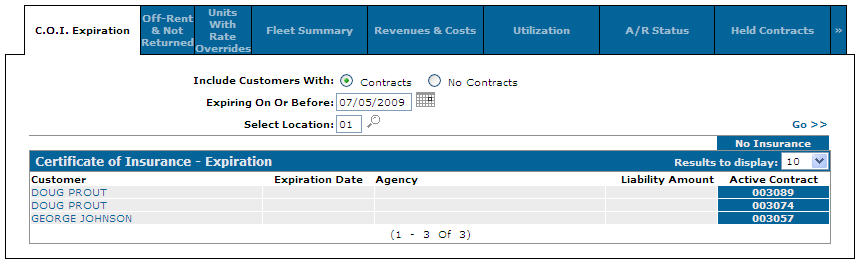
Search fields on the Certificate of Insurance - Expiration tab are:
| Field | Description |
|---|---|
| Include Customers With | Search customers that currently have rental contracts in the system or search customers with no rental contracts in the system. |
| Expiring on or Before | Search for expired certificates of insurance by entering an expiration cut-off date. |
| Select Location | Search for expired certificates of insurance by entering a specific or multiple locations. |
Fields on the Certificate of Insurance - Expiration tab are:
| Field | Description |
|---|---|
| Customer | The name of the customer whose certificate of insurance has expired (or is nearing expiration). |
| Expiration Date | The expiration date on the customer's certificate of insurance. |
| Agency | The insurance agency providing the customer with insurance. |
| Liability Amount | The maximum liability amount of the customer's insurance. |
| Location | The location associated to the contract. |
| Active Contract |
The customer's active insurance contract number. If the contract number is highlighted, the customer currently has no insurance loaded on their rental contract. |
Click a Customer to open the Customer Profile screen.
Data Source: RMCONT, CMASTR
Revision: 2026.01