
Units With Rate Overrides
The Units With Rate Overrides tab displays any rental contract that has had the default rate code overridden on the Contract Details tab in Rental Counter.
To open the Units With Rate Overrides tab, navigate to Product Support > Rental > Supervisor.
 Units With Rate Overrides tab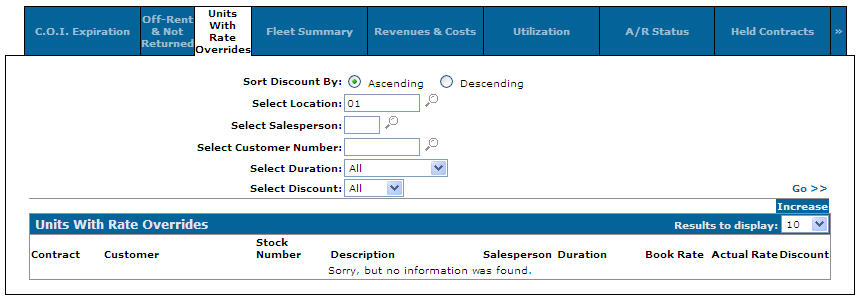
Discount sort options on the Units With Rate Overrides tab are:
| Sort Discount by | |
|---|---|
| Field | Description |
| Ascending | Sorts the search results by ascending to descending discount percentage. |
| Descending | Sort the search results by descending to ascending discount percentage. |
Search fields on the Units With Rate Overrides tab are:
| Field | Description |
|---|---|
| Select Location | Search for a rental contract by entering a location. |
| Select Salesperson | Search for a rental contract by entering a salesperson's id. |
| Select Customer Number | Search for a rental contract by entering a customer number. |
| Select Duration | Search for a rental contract by selecting a rental duration option from the drop down list. |
| Select Discount | Search for a rental contract by selecting a discount amount from the drop down list. |
Fields on the Units With Rate Overrides tab are:
| Field | Description |
|---|---|
| Contract | The rental contract number. |
| Customer | The name of the customer on the rental contract. |
| Stock Number | The rental unit's stock number. |
| Description | A brief description of the rental unit. |
| Salesperson | The name of the salesperson on the rental contract. |
| Duration | The total time the unit is out on the rental contract. |
| Book Rate | The standard rental contract rate. |
| Actual Rate | The actual rental contract rate after the override has been applied. |
| Discount | The discount percentage applied to the rental contract. |
Click a Contract to open the Rental Counter tab.
Click a Customer to open the Customer Profile screen.
Click a Stock Number to open the Equipment Profile screen.
Data Source: RMDETL
Revision: 2026.01