
Held Contracts
The Held Contracts tab displays all rental contracts currently on hold.
To open the Held Contracts tab, navigate to Product Support > Rental > Supervisor.
 Held Contracts tab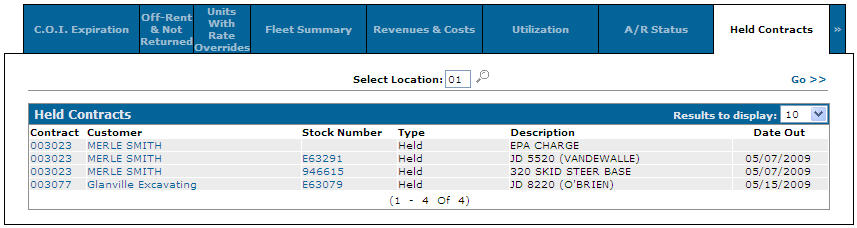
Search fields on the Held Contracts tab are:
| Field | Description |
|---|---|
| Select Location | Search for rental contracts on hold by entering a location or multiple locations. |
Fields on the Held Contracts tab are:
| Field | Description |
|---|---|
| Contract | The number of the held rental contract. |
| Customer | The name of the customer on the rental contract. |
| Stock Number | The stock number of rental unit on the corresponding rental contract. |
| Type | The rental contract held type (e.g. Held, Held Demo, etc.). |
| Description | A brief description of the rental unit on the contract. |
| Location | The location associated to the contract. |
| Date Out | The date the unit went out on a rental transaction. |
Click a Contract number to open the Rental Counter tab.
Click a Customer name to open the Customer Profile screen.
Click a Stock Number to open the Equipment Profile screen.
Data Source: RMCONT
Revision: 2026.01