
Alert Methods
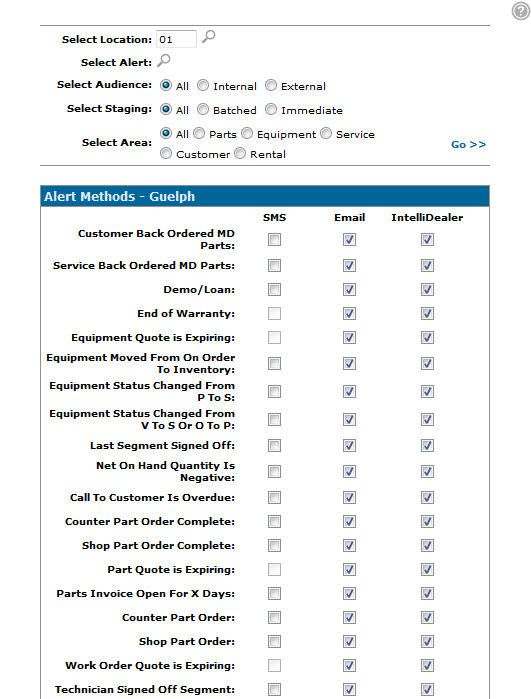
Use the Alert Methods screen to configure the alert deployment methods for the alerts created at your dealership. Depending on the Alert Type, alert messages can be sent via SMS (using VitalEngage Text or Text Connect), Email, or IntelliDealer message.
To open the Alert Methods screen, click the Setup Alert Methods link on the Alerts screen.
Note: Only alert methods that are activated on this screen are used when deploying alert messages to recipients, regardless of the alert message text that is created on the Add Alert/ Edit Alert screen. For example, if you create an SMS Text message for the Counter Part Order alert type, unless you activate the SMS Text switch for the Counter Part Order alert on the Alert Methods screen, no SMS alerts will be sent to the recipients when the conditions of the alert are met.
Topics in this section are:
Setting Alert Methods
-
Navigate to Configuration > Miscellaneous > Other > Alert Management.
-
Click the Setup alert methods link.
-
Enter the location you want to configure the alert methods for in the Select Location field and click Go.
The Alert Methods screen refreshes.
-
Using the checkboxes in the SMS, Email, or IntelliDealer fields, select how each alert will be sent from the selected location.
-
After making your selections, click Save to save your changes.
-or-
Click Close to return to the Alerts screen without saving any changes.
 The
The 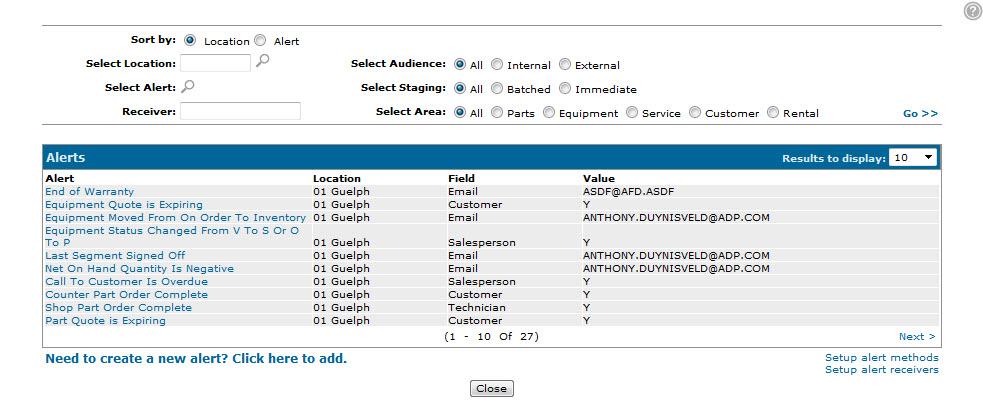
Screen Description
The search fields on the Alert Methods screen are:
| Field | Description |
|---|---|
| Select Location | Search for an alert by entering the location it applies to. |
| Select Alert | Search for an alert by entering the alert name. |
| Select Audience | Search for an alert by selecting the intended audience type. |
| Select Staging | Search for an alert by selecting when the alert has been configured to be sent. |
| Select Area | Search for an alert by selecting the business area that the alert applies to. |
The fields on the Alert Methods screen are:
| Field | Description |
|---|---|
| SMS | If selected, sends alert messages via SMS text to the recipients of the selected alert type. |
| If selected, sends alert messages via email to the recipients of the selected alert type. | |
| IntelliDealer | If selected, sends alert messages via IntelliDealer message to the recipients of the selected alert type. |
The buttons on the Alert Methods screen are:
| Button | Function |
|---|---|
| Save | Saves the changes made on the Alert Methods screen. |
| Close | Closes the Alert Methods screen without saving any changes and returns to the Alerts screen. |