
Area Sales - Accounts
The Area Sales - Accounts screen allows you to view the further details of the selected sale account.
The Area Sales - Account screen can be accessed from the Area Sales - Categories screen by clicking on a Sales Account.
 Area Sales - Accounts screen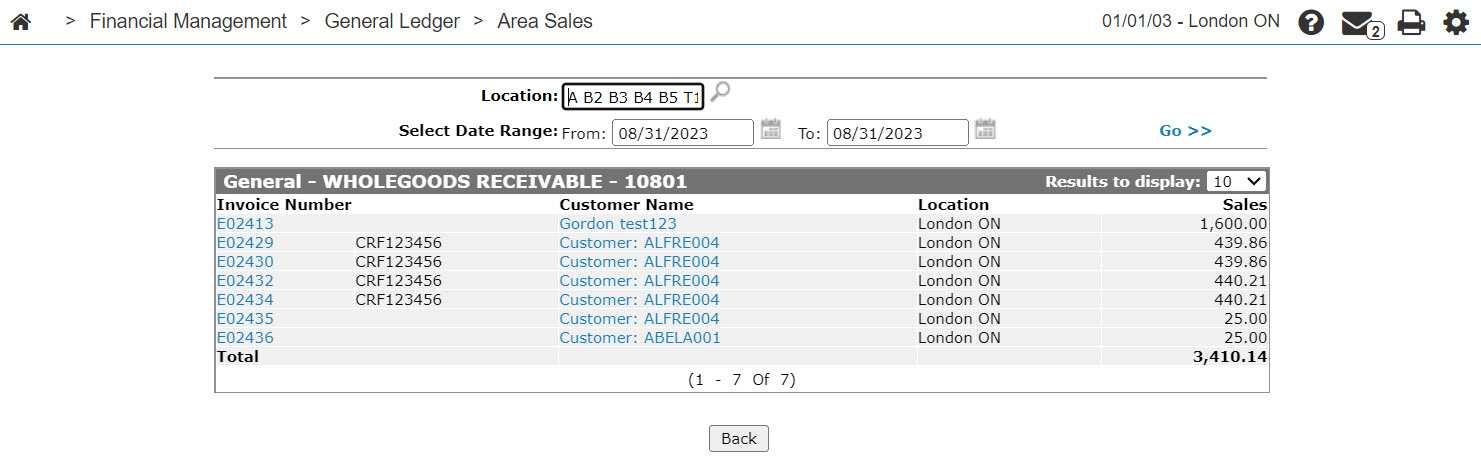
The search fields on the Area Sales - Accounts screen are:
| Field | Description |
|---|---|
| Location | Search for parts invoices by branch location. |
| Select Date Range | Search for parts invoices by entering a date range. |
The fields on the Area Sales - Accounts screen are:
| Field | Description |
|---|---|
| Invoice Number | The invoice number. |
| Part Number | The number of the part on the parts invoice. |
| Customer Name | The customer's name. |
| Location | The branch location where the invoice was created. |
| Sales | The amount of sales on the selected invoice. |
| Cost | The net cost of the part. Do not use any decimals when entering the cost. |
| Margin $ | Displays the current margin for the part being sold. |
| Margin % | Displays the percentage of the current margin for the part being sold. |
Click on an Invoice Number to view a copy of an invoice.
Click on a Part Number to view a copy of an invoice.
Click on a Customer Name to open the Customer Profile screen.
Click Back to complete your work on the Area Sales - Accounts screen.
Security: Financial Management - General Ledger
Revision: 2024.09