
AvaTax: Offline Logging
AvaTax helps dealers stay up-to-date with new taxes as well as tax rate changes.
You can find the AvaTax log files in IntelliDealer at Financial Management > General Ledger > AvaTax. The log files list any transactions where taxes were calculated offline because the AvaTax service was down.
Topics in this section are:
AvaTax Audit Information Tab
Use the AvaTax Audit Information tab to run an audit that compares IntelliDealer billing and tax history with Avalara AvaTax records to identify discrepancies. You can then drill into detailed tax information to resolve issues before they affect tax reporting.
The audit highlights differences between the IntelliDealer records and AvaTax, such as missing invoices or mismatched totals. Each transaction is assigned either a pass or a fail. If it fails, the reason is given. For example, a mismatch in tax totals or a transaction that was found only in Avalara.
 The AvaTax Audit Information tab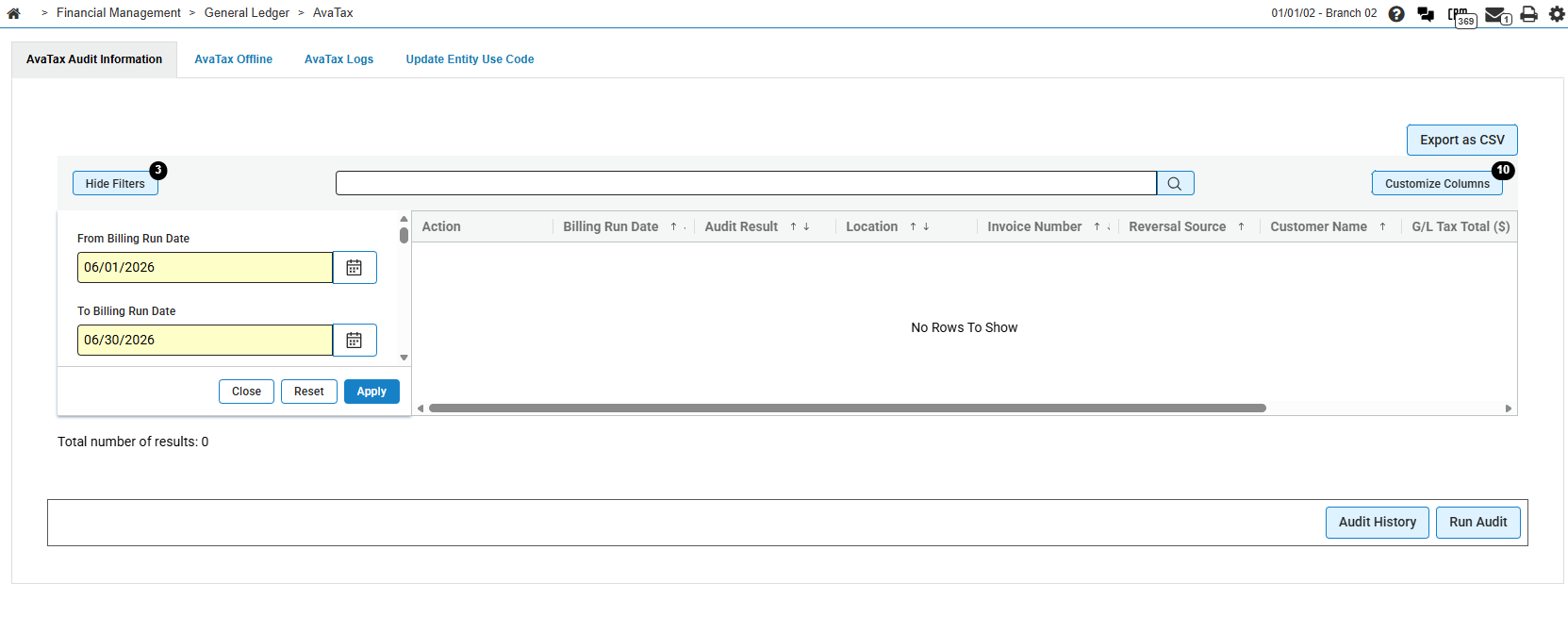
The topics for the AvaTax Audit Information tab are:
Prerequisites
Prerequisites: Before you use the AvaTax Audit Information tab:
-
Avalara AvaTax must be licensed and configured for your company and division. See AvaTax: AvaTax Interface.
-
Each division that runs audits must have exactly one Avalara company code in configuration. Divisions with none or more than one company code are skipped when audits run.
-
You must have access to the Avalara Tax area in IntelliDealer.
Workflow
The AvaTax Audit Information tab compares IntelliDealer billing and tax history with Avalara AvaTax records. Audit data is retrieved from Avalara, loaded into IntelliDealer, and compared to identify discrepancies.
Audits can run automatically or on demand:
-
Scheduled audits — The Avalara - Run Audits Daily batch job can request and process audit data from Avalara. The job is on hold by default until it is resumed in batch jobs. See Scheduled Audit Date Range.
-
Manual audits — Click Run Audit, select a billing run date (or enter a date in the yyyy-MM-dd format), and click Submit. The audit is submitted to batch processing. When the job starts successfully, a confirmation message indicates that the audit was submitted to batch.
If a previous Avalara audit download is still in progress for your division, Run Audit does not start a new audit. A warning message advises you to check Audit History and try again when the download completes.
After audit data is loaded, use the listing on the AvaTax Audit Information tab to review results:
-
Filter by billing run date, location, pass or fail status, audit reason, or other criteria.
-
Review the Audit Result column to identify failed transactions and the reason for each failure.
-
Compare G/L Tax Total ($), AvaTax Tax Total ($), and Variance Amount ($) to investigate tax mismatches.
-
Click an Invoice Number or Reversal Source link to open Invoice History for the related transaction.
-
Click Details on a row to open Audit Details from Avalara. The Details button is not available when the audit reason is Not Transmitted to AvaTax.
-
Click Audit History to review recent audit download requests and their status. See Audit Run History.
-
Click Export as CSV to download failed or filtered audit results for review in Excel or to share with accounting staff.
Tips
-
Filter by Audit Result, Fail, and by Audit Reasons to focus on transactions that need review.
-
Use Export as CSV to download filtered audit results for review in Excel or to share with accounting staff.
-
Review Audit Run History after a manual or scheduled run to confirm that the Avalara download completed.
-
Compare G/L Tax Total ($), AvaTax Tax Total ($), and Variance Amount ($) on failed rows before you open Audit Details.
Understanding Audit Reasons
When a transaction fails the audit, the Audit Result column shows No and one or more audit reasons. Use the reasons to determine whether the issue is a tax total mismatch, a missing transmission, or a record that exists in only one system.
The audit reasons are:
| Reason | Description |
|---|---|
| Total does not match Billing Details | The total tax amount from the Avalara export does not match the general ledger tax total from IntelliDealer billing details. |
| Total does not match AvaTax History | The total tax amount from the Avalara export does not match the AvaTax history total stored in IntelliDealer. |
| Not Transmitted to AvaTax | The transaction was not found in the Avalara export for the audited period. |
| Not Found in IntelliDealer |
Avalara has a document for the transaction, but no matching billing record exists in IntelliDealer. Header totals such as AvaTax Tax Total ($) can show $0.00 even when Avalara has tax on the document. Open Audit Details to review the tax amounts from Avalara. |
Scheduled Audit Date Range
When the Avalara - Run Audits Daily batch job runs, it requests audit data from Avalara for a rolling billing run date range. The range starts four days before the current date and ends four days after the current date (nine days total, centered on today).
For each division with exactly one Avalara company code, the job checks whether an audit download already exists for that exact start and end date. If no matching download exists, the job submits a new audit request to Avalara and processes the results when the download completes.
The scheduled job runs every day at 6:30 AM. It is on hold by default. An administrator must resume it from Administration > Settings > Batch Jobs before automatic daily audits run. See IntelliDealer Batch Jobs and Audit Run History.
Weekly Cleanup Job
The Avalara - Clear Error Logs Weekly batch job runs every Tuesday at 11:00 PM. It purges old AvaTax communication error logs and deletes audit download history records that are older than one year.
This job helps limit storage for AvaTax logs and audit download history. It does not remove current audit header or detail records used on the AvaTax Audit Information tab. See IntelliDealer Batch Jobs.
Filters
Click Filters to open the filter panel. When the panel is open, the button label changes to Hide Filters. A numeric notification badge on the Filters or Hide Filters button shows how many filters are currently active on the listing. When the screen first opens, the default From Billing Run Date and To Billing Run Date filters apply, and the badge reflects those active filters.
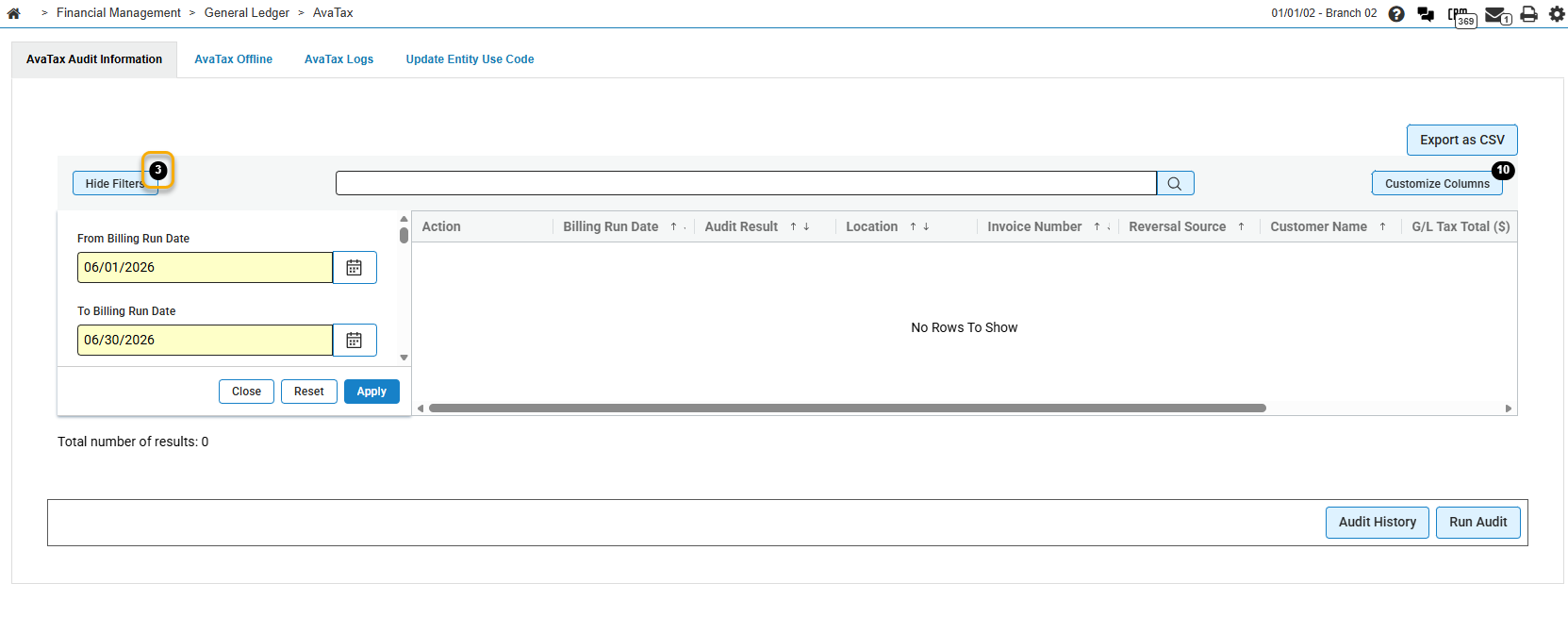
The default From Billing Run Date and To Billing Run Date are set to the previous day. Click Apply to refresh the listing, Reset to clear filter values, or Close to hide the filter panel. Use the search box above the grid to search by keywords across the listing.
The filters on the AvaTax Audit Information tab are:
| Field | Description |
|---|---|
| From Billing Run Date | The start of the billing run date range to include in the audit listing. Defaults to the previous day. |
| To Billing Run Date | The end of the billing run date range to include in the audit listing. Defaults to the previous day. |
| Location | Limits results to one or more locations. Locations are listed as company/division/location with the location description. |
| Audit Result | Filters by pass or fail. Select All, Pass, or Fail. See the Audit Result column description for how pass and fail are displayed. |
| Audit Reasons | Filters by the reason an audit failed. Options include Total does not match Billing Details, Total does not match AvaTax History, Not Transmitted to AvaTax, and Not Found in IntelliDealer. |
| Invoice Number | The invoice or order number associated with the audited transaction. |
| Customer Number | The customer number on the audited transaction. |
| Customer Name | The customer name on the audited transaction. |
| Billing Code | The billing code for the transaction, such as parts, equipment, or rental. |
| Avalara Entity Use Code | The Avalara entity use code on the transaction header. |
| Contract Number | The contract number on the audited transaction. |
| Avalara Transaction ID | The Avalara transaction identifier for the audited record. |
| Purchase Order Number | The purchase order number on the audited transaction. |
| Min AvaTax Tax Total ($) | The minimum AvaTax tax total. See the AvaTax Tax Total ($) column. |
| Max AvaTax Tax Total ($) | The maximum AvaTax tax total. See the AvaTax Tax Total ($) column. |
| Min Tax Total AvaTax History ($) | The minimum tax total from AvaTax history. See the Tax Total AvaTax History column. |
| Max Tax Total AvaTax History ($) | The maximum tax total from AvaTax history. See the Tax Total AvaTax History column. |
| Min G/L Tax Total ($) | The minimum general ledger tax total. See the G/L Tax Total ($) column. |
| Max G/L Tax Total ($) | The maximum general ledger tax total. See the G/L Tax Total ($) column. |
| Min Total Non Taxable ($) | The minimum non-taxable total. See the Total Non Taxable ($) column. |
| Max Total Non Taxable ($) | The maximum non-taxable total. See the Total Non Taxable ($) column. |
| Min Total Liability Amount ($) | The minimum liability amount. See the Total Liability Amount ($) column. |
| Max Total Liability Amount ($) | The maximum liability amount. See the Total Liability Amount ($) column. |
Results Fields
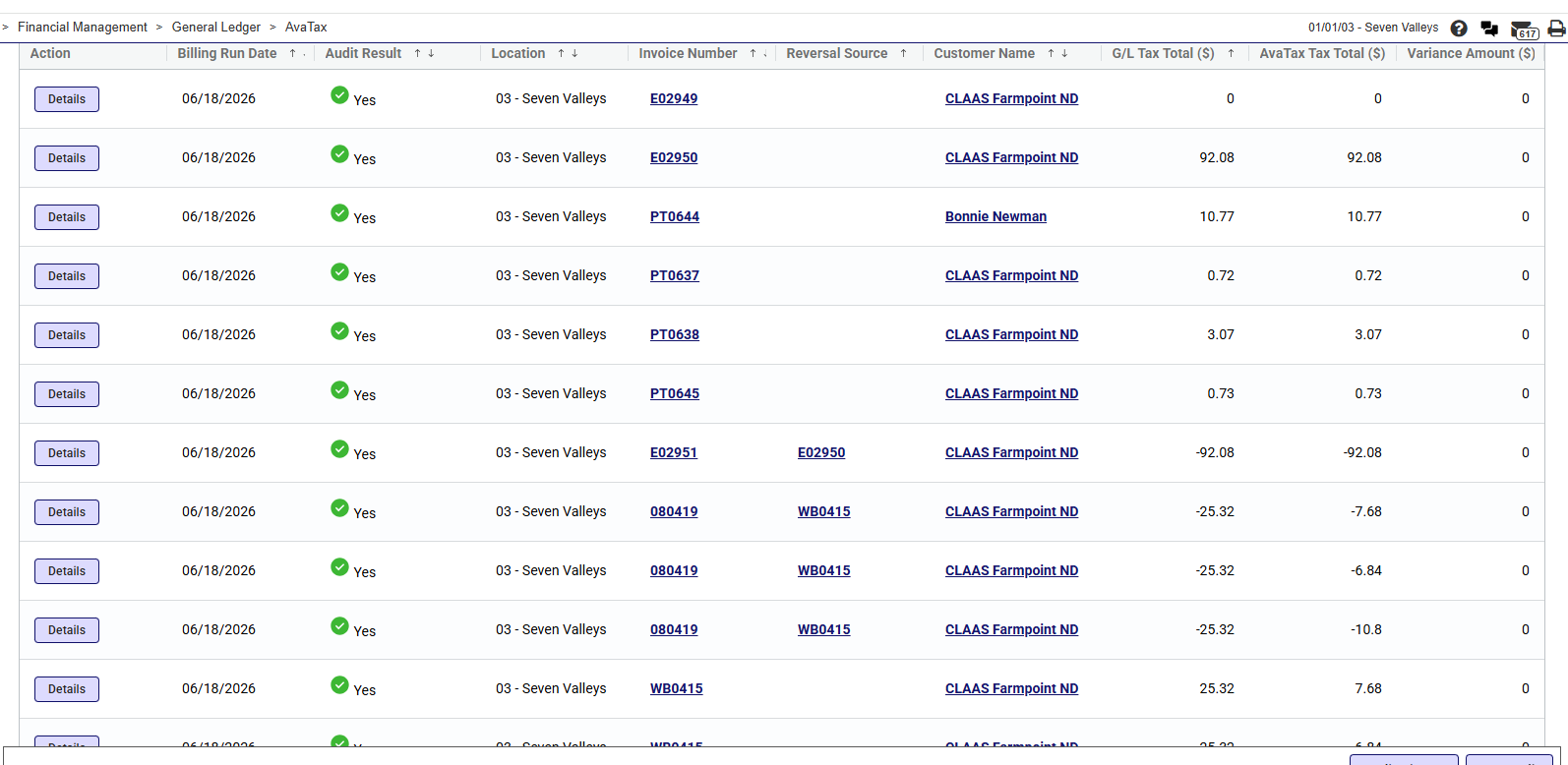
The fields displayed on the AvaTax Audit Information tab are:
| Field | Description |
|---|---|
| Action | Click Details to open audit detail information from Avalara for the selected row. The Details button is not available when the audit reason is Not Transmitted to AvaTax. |
| Billing Run Date | The billing run date for the audited transaction. |
| Audit Result | Whether the transaction passed or failed the audit. A green check mark with Yes indicates a pass. A red icon with No indicates a fail, followed by the audit reason or reasons. Hover over the cell to view the full reason text when it is truncated. |
| Location | The location for the audited transaction. |
| Invoice Number | The invoice or order number. Click the link to open Invoice History for the transaction. For reversal transactions, the reversal transaction ID is used when one is present. |
| Reversal Source | The invoice number of the original transaction when the current row is a reversal. Click the link to open Invoice History for the original transaction. |
| Customer Name | The customer name. Click the link to view customer information in a pop-up when a customer number is available. |
| G/L Tax Total ($) | The total tax amount from IntelliDealer billing details. Compare this value with AvaTax Tax Total ($) and Variance Amount ($). |
| AvaTax Tax Total ($) | The total tax amount from Avalara for the transaction. Compare this value with G/L Tax Total ($) and Variance Amount ($). |
| Variance Amount ($) | The difference between the IntelliDealer and Avalara tax totals for the transaction. |
| Billing Code | The billing code for the transaction. This column is hidden by default. |
| Avalara Transaction ID | The Avalara transaction identifier. This column is hidden by default. |
| Contract Number | The contract number on the transaction. This column is hidden by default. |
| Purchase Order Number | The purchase order number on the transaction. This column is hidden by default. |
| Avalara Entity Use Code | The Avalara entity use code on the transaction header. This column is hidden by default. |
| Tax Total AvaTax History | The tax total from AvaTax history in IntelliDealer. This column is hidden by default. |
| Total Non Taxable ($) | The total non-taxable amount for the transaction. This column is hidden by default. |
| Avalara Transaction ID Of Reversal | The Avalara transaction ID for a reversal transaction. This column is hidden by default. |
| Avalara Transaction ID Of Original | The Avalara transaction ID of the original transaction when the current row is a reversal. This column is hidden by default. |
| Date Added | The date and time the audit record was added. This column is hidden by default. |
| Total Liability Amount ($) | The total tax liability amount from Avalara. This column is hidden by default. |
Click Customize Columns above the grid to show or hide columns. A numeric notification badge on the Customize Columns button shows how many columns are currently visible in the grid.
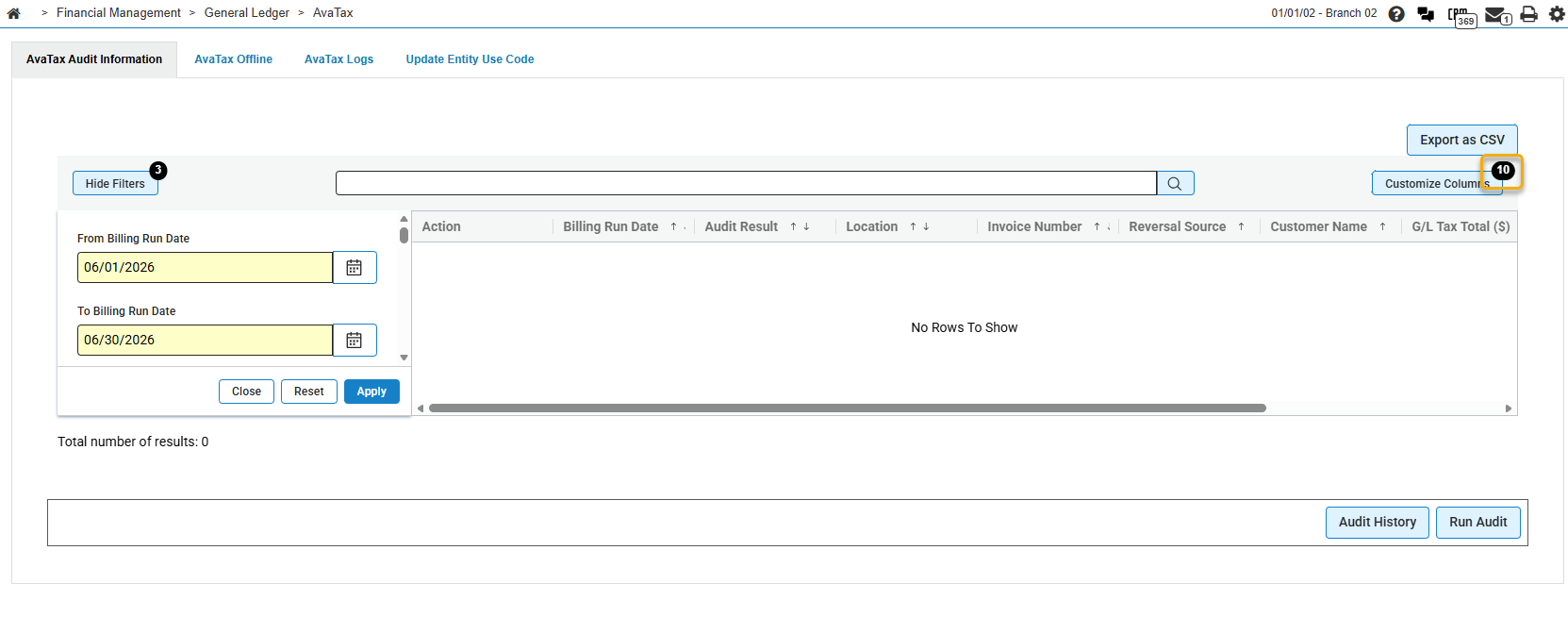
In the column customization panel, select the check box beside a column name to show that column, or clear the check box to hide it. Changes apply to the current grid view. Hidden columns remain available for selection and are included when you export the listing to CSV.
Buttons
The buttons on the AvaTax Audit Information tab are:
| Button | Description |
|---|---|
| Export as CSV | Exports all records matching the current search and filter criteria to a CSV file. The export uses the filters last applied when you clicked Apply. The export is not limited to the visible page and includes all columns, including hidden columns. If no records match the criteria, no file is downloaded. The browser saves the file using a timestamped name such as AvaTaxAuditHeader_[timestamp].csv. |
| Customize Columns | Opens the column customization panel so you can show or hide grid columns. |
| Audit History | Opens the Audit Run History screen, which lists recent audit download activity from Avalara. |
| Run Audit | Opens a dialog where you select a billing run date (or enter a date in the yyyy-MM-dd format) and submit an audit for that date. See Workflow. |
Audit Details
Click Details on a row in the AvaTax Audit Information listing to open Audit Details. This screen shows Avalara document, address, and line-level tax information for the selected transaction. Click Back to return to the listing.
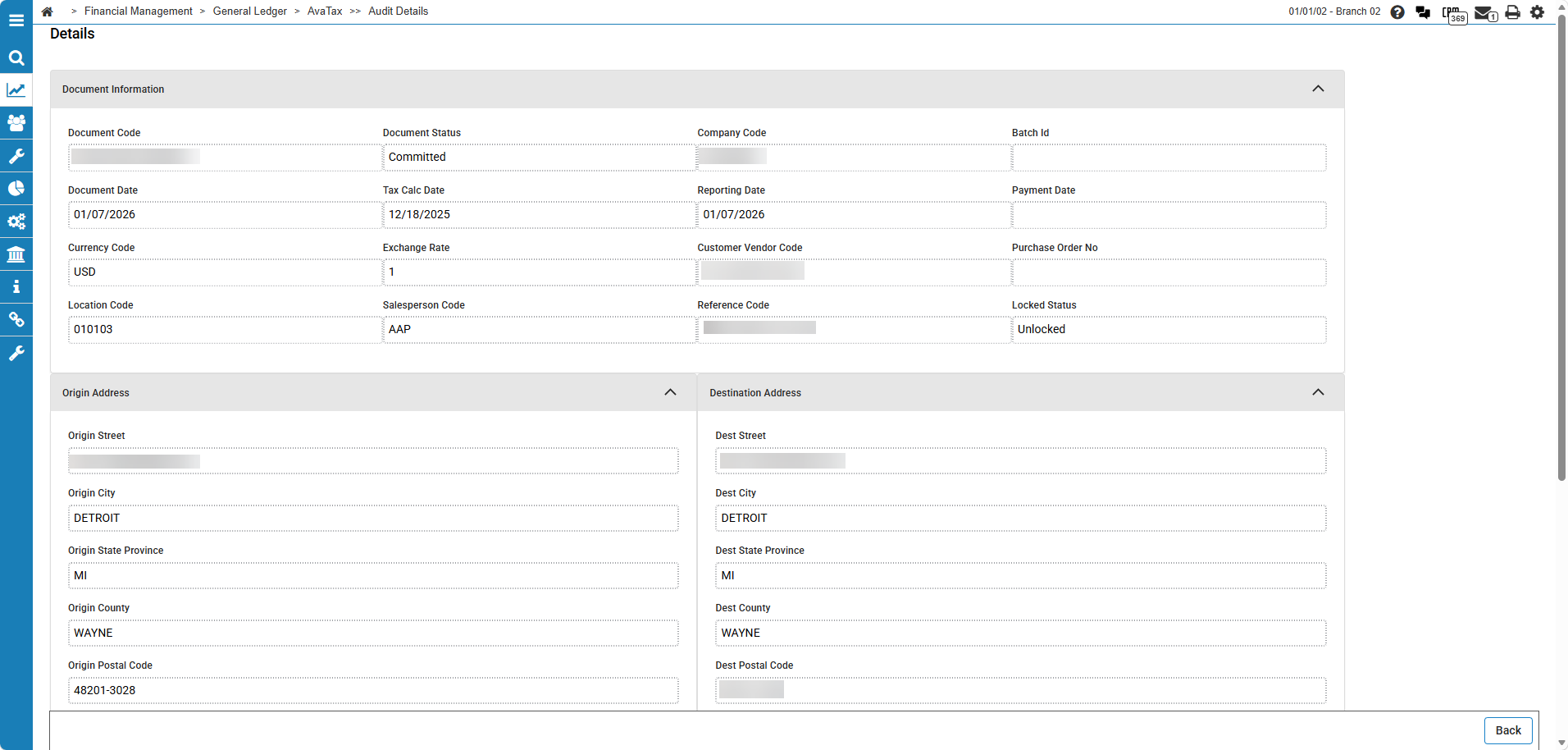
The Document Information section on the Audit Details screen contains:
| Field | Description |
|---|---|
| Document Code | The Avalara document code for the audited transaction. |
| Document Status | The status of the Avalara document. |
| Company Code | The Avalara company code. |
| Batch Id | The Avalara batch identifier. |
| Document Date | The document date in Avalara. |
| Tax Calc Date | The date tax was calculated in Avalara. |
| Reporting Date | The reporting date in Avalara. |
| Payment Date | The payment date in Avalara. |
| Currency Code | The currency code for the document. |
| Exchange Rate | The exchange rate applied to the document. |
| Customer Vendor Code | The customer or vendor code in Avalara. |
| Purchase Order No | The purchase order number on the Avalara document. |
| Location Code | The Avalara location code. |
| Salesperson Code | The salesperson code on the document. |
| Reference Code | The reference code that links the Avalara document to the IntelliDealer transaction. |
| Locked Status | Whether the Avalara document is locked. |
The Origin Address section contains:
| Field | Description |
|---|---|
| Origin Street | The origin street address used for tax calculation. |
| Origin City | The origin city. |
| Origin State Province | The origin state or province. |
| Origin County | The origin county. |
| Origin Postal Code | The origin postal code. |
| Origin Country | The origin country. |
| Business Identification Id | The business identification ID for the origin address. |
The Destination Address section contains:
| Field | Description |
|---|---|
| Dest Street | The destination street address used for tax calculation. |
| Dest City | The destination city. |
| Dest State Province | The destination state or province. |
| Dest County | The destination county. |
| Dest Postal Code | The destination postal code. |
| Dest Country | The destination country. |
The Lines section lists line-level tax detail from Avalara for the selected document only. Click Export as CSV to download the lines currently shown in the grid, including any column filter or sort you applied on the Lines grid. The browser saves the file using a timestamped name such as AvaTaxAuditDetailLines_[timestamp].csv. If no lines are displayed, no file is downloaded. The fields in the Lines section are:
| Field | Description |
|---|---|
| Action | Click Details to open Line Details for the selected line. |
| Item Code | The Avalara item code for the line. |
| Item Code Description | The description of the item code. |
| Tax Code | The tax code applied to the line. |
| Line Amount ($) | The line amount before tax. |
| Line Taxable Amount ($) | The taxable amount for the line. |
| Tax Amount ($) | The tax amount calculated for the line. |
| Rate | The tax rate applied to the line, shown as a percentage. |
| Jurisdiction Description | The tax jurisdiction for the line. |
| Tax Type Description | The type of tax applied to the line. |
| Line No | The line number on the Avalara document. |
Line Details
Click Details on a line in the Lines section of Audit Details to open Line Details. This screen shows read-only Avalara tax detail for the selected line. Click Back to return to Audit Details.
The Line Details section contains:
| Field | Description |
|---|---|
| Line No | The line number on the Avalara document. |
| Item Code | The Avalara item code for the line. |
| Item Code Description | The description of the item code. |
| Tax Code | The tax code applied to the line. |
| Tax Code Description | The description of the tax code. |
| Rate Type | The rate type used for tax calculation on the line. |
| Quantity | The quantity on the line. |
| Line Amount ($) | The line amount before tax. |
| Discount Amount ($) | The discount amount applied to the line. |
The Tax Amounts section contains:
| Field | Description |
|---|---|
| Tax Amount ($) | The tax amount for the line. |
| Tax Variance ($) | The variance between calculated and reported tax for the line. |
| Rate | The tax rate applied to the line, shown as a percentage. |
| Tax Liability ($) | The tax liability amount for the line. |
| Tax Calculated ($) | The tax amount calculated by Avalara for the line. |
| Revenue Account | The revenue account associated with the line. |
| Tax Authority Name | The name of the tax authority. |
| Tax Authority Id | The identifier of the tax authority. |
| Line Taxable Amount ($) | The taxable amount for the line. |
| Line Exempt Amount ($) | The exempt amount for the line. |
| Non Taxable Amount ($) | The non-taxable amount for the line. |
| Jurisdiction Type Taxable Amount ($) | The taxable amount for the jurisdiction type. |
| Jurisdiction Type Exempt Amount ($) | The exempt amount for the jurisdiction type. |
| Override Amount ($) | Any override amount applied to tax on the line. |
The Exemption Information section contains:
| Field | Description |
|---|---|
| Entity Use Code Document Line | The entity use code applied at the line level. |
| Exemption No | The exemption number for the line. |
| Exemption Description | The description of the exemption. |
| Exempt Reason | The reason the line is exempt from tax. |
| Non Taxable Reason | The reason the line is non-taxable. |
| Non Taxable Rule Description | The rule description for the non-taxable amount. |
The Jurisdiction Information section contains:
| Field | Description |
|---|---|
| Jurisdiction Description | The tax jurisdiction for the line. |
| Jurisdiction Type Description | The jurisdiction type, such as state, county, or city. |
| Tax Type Description | The type of tax applied to the line. |
| Tax Sub Type | The tax sub-type applied to the line. |
| State Province | The state or province for the jurisdiction. |
| State Assigned No | The state-assigned number for the jurisdiction. |
| Sourcing | Whether tax is sourced from the origin or destination address. |
| In State | Whether the transaction is in-state for the jurisdiction. Displays Yes or No. |
The Other Information section contains:
| Field | Description |
|---|---|
| Is Taxable | Whether the line is taxable. Displays Yes or No. |
| Is Sstp | Whether the line is subject to Streamlined Sales Tax Protocol (SSTP). Displays Yes or No. |
| Ecms Cert Id | The Avalara exemption certificate identifier for the line, when a tax exemption certificate applies. This value comes from Avalara's Exemption Certificate Management (ECM) system. |
| Exchange Rate Currency Code | The currency code used for the exchange rate on the line. |
| Line Tax Detail Id | The Avalara line tax detail identifier. |
| Id | The Avalara identifier for the line detail record. |
| Ref1 | The first reference value from Avalara for the line. |
| Ref2 | The second reference value from Avalara for the line. |
Audit Run History
Click Audit History on the AvaTax Audit Information tab to open Audit Run History. This screen lists the most recent audit download requests from Avalara, including manual and scheduled runs. Click Back to return to the listing.
The fields displayed on the Audit Run History screen are:
| Field | Description |
|---|---|
| Date Added | The date and time the audit download record was created. |
| Audit Run Start Date | The start date of the billing run date range requested from Avalara. |
| Audit Run End Date | The end date of the billing run date range requested from Avalara. |
| Run Status | The status of the audit report request in Avalara, such as whether it has completed. |
| Download Completed | Whether the audit data has been downloaded from Avalara into IntelliDealer. Displays Yes or No. A pending download prevents a new Run Audit request for the division. |
| Created By | The user who requested the audit, or SYSTEM for scheduled runs. |
| Division | The division for which the audit was requested. |
| Company Code | The Avalara company code for the audit request. |
| ID | The internal identifier for the audit download record. This column is hidden by default. |
| Avalara Report ID | The Avalara report identifier. This column is hidden by default. |
Troubleshooting
If you experience issues with AvaTax audit reconciliation, verify these items:
-
The audit seems to hang or no new results appear — Open Audit Run History and check whether a download is still InQueue or InProgress. Wait for the download to complete before you run another audit.
-
Run Audit does not start a new audit — A previous Avalara audit download may still be in progress for your division. The system displays a warning message. Check Audit History and try again when Download Completed shows Yes.
-
No rows appear for your division — Confirm that the division has exactly one Avalara company code configured. Divisions with none or more than one company code are skipped.
-
Not Found in IntelliDealer rows show $0.00 tax totals — The row is identified correctly, but header amounts can show $0.00 when Avalara has tax on the document. Open Audit Details to compare the Avalara line-level tax amounts.
AvaTax Offline Tab
The search fields on the AvaTax Offline tab of the AvaTax screen are:
| Field | Description |
|---|---|
| Location |
The location. |
| Status | The status of the bill run. |
| Invoice | The invoice number. |
| Line | Which tax code is being used. |
| Item | The stock number on the taxable item. |
| Description | A brief description of the item. |
| Quantity | The amount of items available. |
| Amount | The total amount of tax applied. |
| Tax Date | The date the item was taxed. |
Note: The system automatically sends these transactions at 11 pm(EST) each evening but they can be sent manually throughout the day by clicking the Transmit button.
AvaTax Logs Tab
Use the AvaTax Logs tab to view communications logs. Avalara charges dealers for each API call made to their system. This tab lists the calls made so you can monitor usage. IntelliDealer limits repetitive calls to Avalara by ensuring each call is unique, thereby avoiding unnecessary charges.
Topics for the AvaTax Logs tab are:
Click the Purge Logs button to purge old logs. Logs that are more than two months old are automatically purged at 11 pm each Monday.
Click Call Log Report to generate an AvaTax Communication Log Report (ACLR) PDF. The on-screen log listing shows individual communication entries; the ACLR report provides monthly totals by system so you can monitor usage that may affect Avalara billing. See AvaTax Communication Log Report for metric and column descriptions.
Sample report: ACLR.pdf
To view the report, click the printer icon and open the PDF Viewer tab.
AvaTax Communication Log Report
The AvaTax Communication Log Report (ACLR) summarizes AvaTax API activity for the last 12 months. Use the report to review how many tax calculation requests IntelliDealer sent to Avalara and how many duplicate requests were prevented from being sent.
The reporting period includes the current calendar month and the preceding 11 months. IntelliDealer stores monthly call totals in the AVATAXCS table and removes records older than 12 months.
The report lists monthly totals by IntelliDealer system application. Each row shows one system for one month, such as Parts Ordering or Work Orders. When several systems appear in the same month, the month name is shown on the first row for that month only. A Total row at the bottom summarizes calls made, calls avoided, and the overall avoidance percentage across all months and systems.
The metrics on the report are:
| Metric | Description |
|---|---|
| Calls Made | The number of AvaTax API calls IntelliDealer sent to Avalara to calculate tax. Each count represents one tax calculation request that was transmitted to Avalara. |
| Calls Avoided | The number of duplicate tax calculation requests IntelliDealer prevented from being sent to Avalara. IntelliDealer compares each new request to the last request sent the same day for the same document and transaction type. When the request is unchanged, IntelliDealer reuses the prior result instead of sending another API call. |
| Avoidance Percentage | The percentage of tax calculation attempts that were avoided because they were duplicates. IntelliDealer calculates this value as Calls Avoided divided by the sum of Calls Made and Calls Avoided, multiplied by 100. A higher percentage means more duplicate requests were suppressed and fewer billable API calls were sent to Avalara. |
Note: When AvaTax call avoidance is disabled at your dealership, the report displays a message that call avoidance is disabled. In that case, IntelliDealer sends all tax calculation requests to Avalara and does not record avoided calls.
The columns on the AvaTax Communication Log Report PDF are:
| Column | Description |
|---|---|
| Month | The calendar month for the totals on the row. When multiple systems appear for the same month, the month name is shown on the first row only. |
| System | The IntelliDealer system application that generated the AvaTax API activity, such as Parts Ordering or Work Orders. |
| Calls Made | The number of AvaTax API calls sent to Avalara for the system during the month. |
| Calls Avoided | The number of duplicate tax calculation requests prevented from being sent to Avalara for the system during the month. |
| Avoidance Percentage | The percentage of tax calculation attempts that were avoided for the system during the month. |
| Total | The summary row at the bottom of the report. It shows the combined Calls Made, Calls Avoided, and Avoidance Percentage for all months and systems in the reporting period. |
Log Listing Fields
The fields displayed on the AvaTax Logs tab are:
| Field | Description |
|---|---|
| Document Number |
The document ID number for the communication log. |
| Time | The time the communication log was created. |
| Summary | A summary of the communication log. |
| Details | Any supplemental details for the communication log if applicable. |
AvaTax Product Codes
Use the AvaTax Product Codes screen to select a product code from the list. Valid codes are imported into IntelliDealer from Avalara. See AvaTax: AvaTax Interface.
You can access the AvaTax Product Codes screen by clicking the search  icon next to an AvaTax Product Code field on screens selling things such as Parts, Miscellaneous Charges, Equipment Segments, or Rental.
Click a product code to add it to the previous screen.
Click Close to exit without selecting a code.