
Kubota - Interface Configuration
Use the Kubota Interface Configuration screen to configure the Kubota Key (provided by Kubota) required to access Kubota parts information, The Kubota Interface populates the Kubota Order Status and Kubota Availability screens, and allows you to transmit parts orders directly to Kubota using the Kubota Parts Order tab.
Prerequisite:: A Kubota key obtained from the Kubota Link website. See also, Configuring the Kubota Parts Ordering/ Availability Interfaces.
Navigate to Configuration > Interfaces > Kubota > Interface Configuration.
The Interface Configuration screen includes three tabs:
Kubota
The Kubota tab is used to set the Kubota Key for each Kubota dealer number.
A valid key is required for IntelliDealer to access Kubota parts and ordering services.
The fields on the Kubota screen are:
| Field | Description |
|---|---|
| Dealer Number | Lists all Kubota dealer numbers assigned to your dealership. Can be filtered using the search box. |
| Key | The Kubota access key provided by Kubota. Enter a unique key for each dealer number. |
Vendors
The Vendors tab lists all vendor records associated with Kubota.
A correct Kubota vendor must be assigned before entering dealer numbers or Kubota Keys.
-
Navigate to Configuration > Interfaces > Kubota > Interface Configuration, then click the Vendor tab.
-
Locate your Kubota vendor. If you do not see it, click Assign Manufacturer. Then search for your vendor and select it.
-
Click the Dealer Numbers tab and look for your Kubota dealer numbers.
-
If your Kubota dealer numbers are not listed, follow these steps:
-
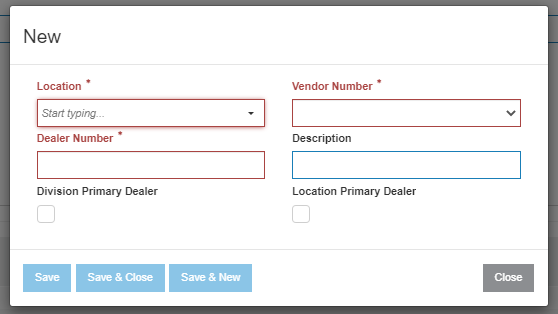
Click Create.
-
Select the location , vendor number, and enter your dealer number. The other fields are optional.
-
Click Save & New to go to the next dealer number, or Save & Close to go back to the Dealer tab.
-
-
Click the Kubota tab.
-
Select the first dealer number and enter the key that was provided by Kubota.
-
Click Save & Next to go to the next dealer number
 Kubota Interface Configuration screen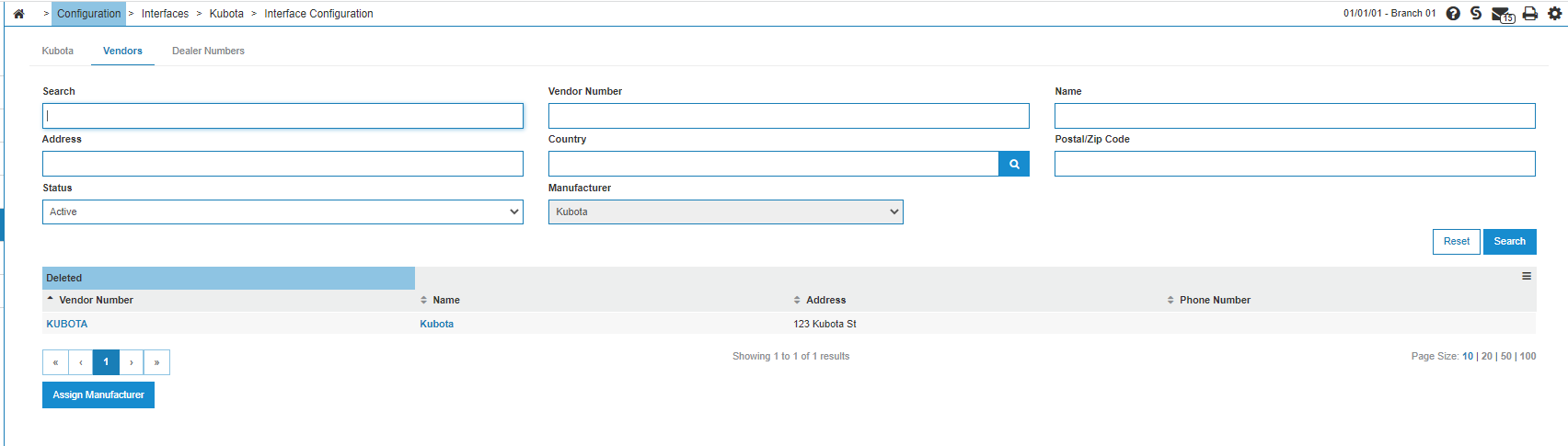
The fields on the Vendor screen are:
| Field | Description |
|---|---|
| Search | General search for vendor name or number. |
| Vendor Number | Filters by the vendor’s unique identifier. |
| Name | Searches by vendor name |
| Address / Country / Postal/Zip Code | Filters based on vendor address details. |
| Status | Filters by Active, Inactive, or Deleted vendors. |
| Manufacturer | Auto-selected as Kubota and cannot be changed. |
Dealer Numbers Tab
The Dealer Numbers tab displays all Kubota dealer numbers assigned to your dealership.
Each dealer number must be linked to a vendor and can be designated as a primary dealer for a location or division
The fields on the Dealer Numbers screen are:
| Field | Description |
|---|---|
| Vendor Number | Filters by associated vendor record. |
| Dealer Number | Filters by Kubota dealer number. |
| Location | Filters by dealership location. |
| Manufacturer | Auto-selected as Kubota. |
| Division Primary Dealer | Filters for dealer numbers marked as division primary. |
| Location Primary Dealer | Filters for dealer numbers set as location primary. |
| Include Deactivated Vendors | Includes dealer numbers tied to inactive vendors. |