

CNH NGPC Start Digits
Use the CNH NGPC Start Digits screen to map different vendor brands to the corresponding start digits of their vendor ID in the Case New Holland Next Generation Parts Catalog (CNH NGPC). Mapping the start digits is required to view part information in the CNH NGPC.
To access the screen, navigate to Configuration > Interfaces > CNH > NGPC Start Digits.
Fields on the CNH NGPC Start Digits screen are:
| Field | Description |
|---|---|
| Line | This field is system generated and is used to keep track of each of the start digits. |
| Brand | The vendor brand name. |
| Start Digit | The start digits of the vendor ID number. |
Click the Add> link to enter more than 10 start digits to the CNH NGPC.
Click Save to save the information on the CNH NGPC Start Digits screen.
 NGPC StartDigits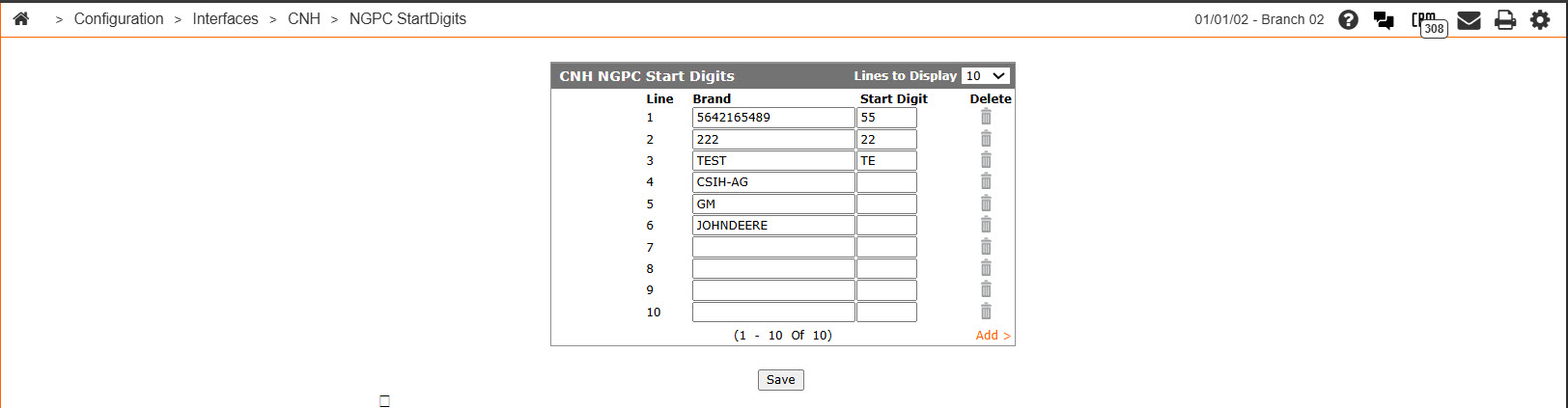
Security: 999-Configuration
Revision: 2026.02