
Worldpay: Users
To access the Worldpay third-party users, navigate to Configuration > Interfaces > Other > Worldpay Payment Interface, and click the Users tab. The screen displays a list of the third-party users configured for the Worldpay interface.
Click anywhere on the row of the User Name you are interested in to open the Edit screen:
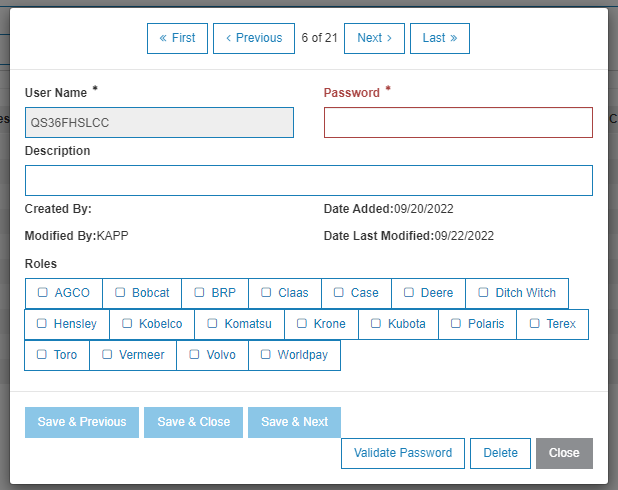
The fields on this page are:
| Field | Description |
|---|---|
| User Name | The name of the third-party user. The User Name is auto-generated and is your data library and 5 random letters. |
| Password |
When creating a new third-party user, enter a password. Warning: Changing the password after initial creation will cause the user to be unable to log in to the interface. If you do change the password, you must update the third-party that uses the ID about the new password. |
| Description | Optional. A description to help you identify the third-party user. |
| Date Added | The date the third-party user was added to IntelliDealer. |
| Created by User | The user who created this third-party user. |
| Date Modified | The date this third-party user was modified. |
| Date Modified by User | The user who modified this third-party user. |
| Roles | Third-party systems that can be checked individually. |
Use these buttons to complete your work:
-
Save & Previous—save the current changes and go to the previous third-party user.
-
Save & Close—save the current changes and close the window.
-
Save & Next—save the current changes and go to the next third-party user.
-
Validate Password—opens a dialogue into which you can enter a password associated with the current third-party user ID. It does not update the password, merely validates whether it is a valid password for that ID.
-
Delete—remove the current third-party user.
-
Close—closes the window.