
Word Wrapping on Accounts Payable Checks
When accounts payable checks are printed the dollar amount is printed as a number and as text. For example:
01R689623
5/18/00 ****291,451.00
TWO HUNDRED & NINETY ONE THOUSAND FOUR HUNDRED & FIFTY ONE DOLLARS & 00 CENTS
A Good Business
234 Main Street
Hometown ON A1A-2B2
If the wording does not appear it is because the text is too long for the space provided. For example, a check for $777,777.00 will look like:
01R443566
5/18/00 ****777,777.00
A Good Business
234 Main Street
Hometown ON A1A-2B2
For specific logic, see Example Scenarios.
Topics in this section include:
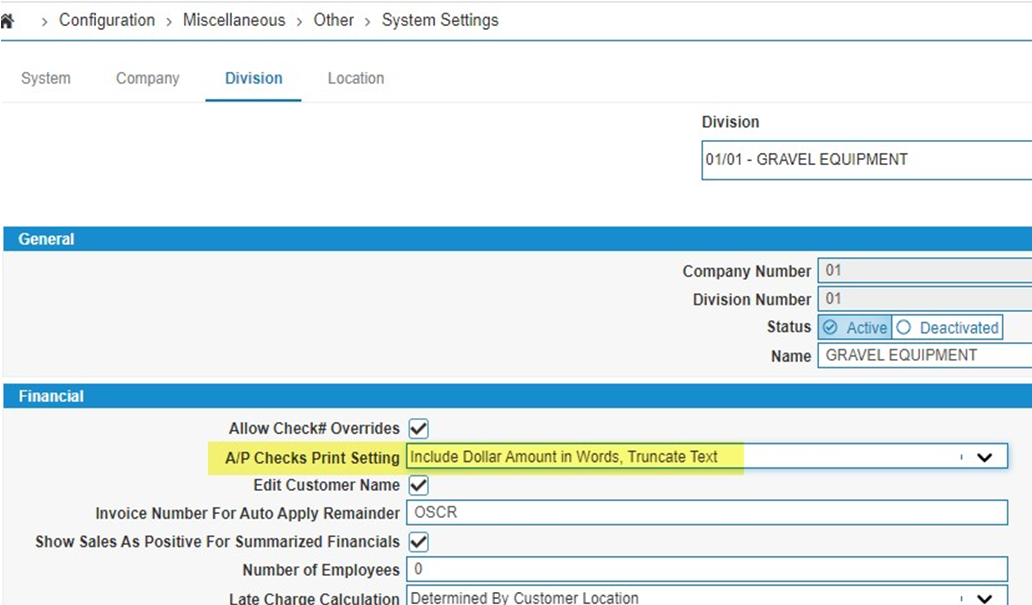
Settings for Wrapping
The wording can be set to wrap if it exceeds the space available on one line by setting the A/P Checks Print Setting parameter in System Settings - Division.
Localization Behavior and Settings
Dealers are deemed Canadian or American based on the Company Location parameter in System Settings - Company. The check format follows that setting by company (not by division or vendor). It appears as:
01R014403
3/01/06 ****888,777.33
EXACTLY EIGHT HUNDRED & EIGHTY EIGHT THOUSAND SEVEN HUNDRED &
SEVENTY SEVEN DOLLARS & 33 CENTS
A Good Business
234 Main Street
Hometown ON A1A-2B2
The number of characters to be wrapped is affected by the currency Code used by the dealer and the verbiage set for that currency. If some verbiage is to be printed, such as DOLLARS and CENTS, that will add to the characters, however, the verbiage could also be left blank, reducing the total number of characters.
To modify these configurations go to:
-
The currency Code is configured under Configuration > General Ledger > Accounts Payable > Currency.
-
The verbiage for a currency Code is set in the A/P Checks & A/R Statement Verbiage parameter on the Add Currency/Change Currency screen.
When wrapping check wording, Canadian and non-Canadian dealers wrap differently. The total wording characters that can print is 122 characters. The Canadian dealer's checks wrap after 61 characters while for non-Canadian dealer's checks IntelliDealer tries to print 80 characters on the first line and if more than 80 characters, wrap back to 61 characters.
Also note that the wording is left justified for Canadian dealers and right justified for non-Canadian dealers. For Canadian format checks IntelliDealer does not print a dollar sign $ and instead prints *******nnn.nn. For other currencies, IntelliDealer prints the $ before the amount. There is no switch to control whether or not the dollar sign prints.
Example Scenarios
The following are examples of how check wording prints in full check format. Each example represents a different scenario.
 Canadian dealer, no wrapping, wording fits on 1 line, no currency verbiage:
04/30/15 1303 01 050613
34567890 06/24/2015 100.00 100.00 34143
FINAL TOTALS 100.00 100.00
050613
04302015
EXACTLY ONE HUNDRED DOLLARS & 00 CENTS ********100.00
A Good Business
234 Main Street
Hometown ON A1A-2B2
Canadian dealer, no wrapping, wording fits on 1 line, currency verbiage:
04/30/15 1303 01 050614
34567890 06/24/2015 100.00 100.00 34143
FINAL TOTALS 100.00 100.00
050614
04302015
EXACTLY ONE HUNDRED DOLLARS & 00 CENTS ********100.00
Test Funds
A Good Business
234 Main Street
Hometown ON A1A-2B2
Canadian dealer, no wrapping, wording will not fit on 1 line, no currency verbiage:
04/30/15 1303 01 050615
34567890 06/24/2015 777717770.00 777717770.00 34143
FINAL TOTALS 777717770.00 777717770.00
050615
04302015
777,717,770.00
A Good Business
234 Main Street
Hometown ON A1A-2B2
Canadian dealer, no wrapping, wording will not print on 1 line, currency verbiage:
04/30/15 1303 01 050616
34567890 06/24/2015 777717770.00 777717770.00 34143
FINAL TOTALS 777717770.00 777717770.00
050616
04302015
777,717,770.00
Test Funds
A Good Business
234 Main Street
Hometown ON A1A-2B2
Non-Canadian dealer, no wrapping, wording fits on 1 line, no currency verbiage:
04/30/15 1303 01 050617
34567890 06/24/2015 100.00 100.00 34143
FINAL TOTALS 100.00 100.00
050617
04/30/15 $100.00
EXACTLY ONE HUNDRED DOLLARS & 00 CENTS
A Good Business
234 Main Street
Hometown ON A1A-2B2
Non-Canadian dealer, no wrapping, wording fits on 1 line, currency verbiage:
04/30/15 1303 01 050618
34567890 06/24/2015 100.00 100.00 34143
FINAL TOTALS 100.00 100.00
050618
04/30/15 $100.00
Test Funds
A Good Business
234 Main Street
Hometown ON A1A-2B2
Non-Canadian dealer, no wrapping, wording will not fit on 1 line, no currency verbiage:
04/30/15 1303 01 050619
34567890 06/24/2015 777717770.00 777717770.00 34143
FINAL TOTALS 777717770.00 777717770.00
050619
04/30/15 $777,717,770.00
A Good Business
234 Main Street
Hometown ON A1A-2B2
Non-Canadian dealer, no wrapping, wording will not fit on 1 line, currency verbiage:
04/30/15 1303 01 050620
34567890 06/24/2015 777717770.00 777717770.00 34143
FINAL TOTALS 777717770.00 777717770.00
050620
04/30/15 $777,717,770.00
Test Funds
A Good Business
234 Main Street
Hometown ON A1A-2B2
Canadian dealer, wrapping, wording fits on 1 line, no currency verbiage:
04/30/15 1303 01 050621
34567890 06/24/2015 100.00 100.00 34143
FINAL TOTALS 100.00 100.00
050621
04302015
EXACTLY ONE HUNDRED DOLLARS & 00 CENTS ********100.00
A Good Business
234 Main Street
Hometown ON A1A-2B2
Canadian dealer, wrapping, wording fits on 1 line, currency verbiage:
04/30/15 1303 01 050622
34567890 06/24/2015 100.00 100.00 34143
FINAL TOTALS 100.00 100.00
050622
04302015
EXACTLY ONE HUNDRED DOLLARS & 00 CENTS ********100.00
Test Funds
A Good Business
234 Main Street
Hometown ON A1A-2B2
Canadian dealer, wrapping, wording will not fit on 1 line, no currency verbiage:
04/30/15 1303 01 050623
34567890 06/24/2015 777717770.00 777717770.00 34143
FINAL TOTALS 777717770.00 777717770.00
050623
04302015
EXACTLY SEVEN HUNDRED & SEVENTY SEVEN MILLION SEVEN HUNDRED & 777,717,770.00
SEVENTEEN THOUSAND SEVEN HUNDRED & SEVENTY DOLLARS & 00 CENTS
A Good Business
234 Main Street
Hometown ON A1A-2B2
Canadian dealer, wrapping, wording will not fit on 1 line, currency verbiage:
04/30/15 1303 01 050624
34567890 06/24/2015 777717770.00 777717770.00 34143
FINAL TOTALS 777717770.00 777717770.00
050624
04302015
EXACTLY SEVEN HUNDRED & SEVENTY SEVEN MILLION SEVEN HUNDRED & 777,717,770.00
SEVENTEEN THOUSAND SEVEN HUNDRED & SEVENTY DOLLARS & 00 CENTS
Test Funds
A Good Business
234 Main Street
Hometown ON A1A-2B2
Non-Canadian dealer, wrapping, wording fits on 1 line, no currency verbiage:
04/30/15 1303 01 050625
34567890 06/24/2015 100.00 100.00 34143
FINAL TOTALS 100.00 100.00
050625
04/30/15 $100.00
EXACTLY ONE HUNDRED DOLLARS & 00 CENTS
A Good Business
234 Main Street
Hometown ON A1A-2B2
Non-Canadian dealer, wrapping, wording fits on 1 line, currency verbiage:
04/30/15 1303 01 050626
34567890 06/24/2015 100.00 100.00 34143
FINAL TOTALS 100.00 100.00
050626
04/30/15 $100.00
Test Funds
EXACTLY ONE HUNDRED DOLLARS & 00 CENTS
A Good Business
234 Main Street
Hometown ON A1A-2B2
Non-Canadian dealer, wrapping, wording will not fit on 1 line, no currency verbiage:
04/30/15 1303 01 050627
34567890 06/24/2015 777717770.00 777717770.00 34143
FINAL TOTALS 777717770.00 777717770.00
050627
04/30/15 $777,717,770.00
EXACTLY SEVEN HUNDRED & SEVENTY SEVEN MILLION SEVEN HUNDRED &
SEVENTEEN THOUSAND SEVEN HUNDRED & SEVENTY DOLLARS & 00 CENTS
A Good Business
234 Main Street
Hometown ON A1A-2B2
Non-Canadian dealer, wrapping, wording will not fit on 1 line, currency verbiage:
04/30/15 1303 01 050628
34567890 06/24/2015 777717770.00 777717770.00 34143
FINAL TOTALS 777717770.00 777717770.00
050628
04/30/15 $777,717,770.00
Test Funds
A Good Business
234 Main Street
Hometown ON A1A-2B2