Running a Cash Balancing Report
Running a Cash Balancing report balances cash received from invoicing applications such as Parts, Service, Rental, Equipment Invoicing, General Invoicing and cash received from cash receipts in A/R.
-
Navigate to Financial Management > Accounts Receivable > A/R Reports .
The Financial A/R Reports screen appears.
-
Click on the Cash Balancing link.
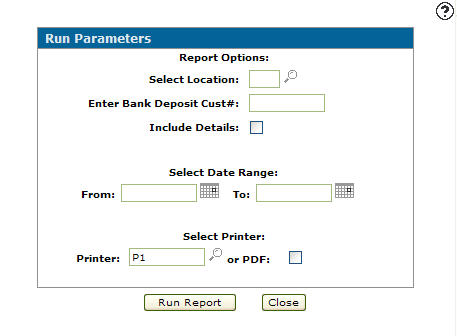
The Run Parameters screen appears.
-
Enter a Location.
- or -
Click on the Search icon and select a location from the Location Selection screen.
 -
Enter a Bank Deposit Cust #. A customer number used to transfer the bank deposit from the cash account to the bank account.
-
Select the Include Details checkbox to print all invoices and all cash receipts.
-
Enter a Date Range to include all the billing runs and cash receipts within the date range.
-
Enter the Printer which will print the report.
- or -
Click on the Search icon and select a print from the Printers screen. -
(OPTIONAL) select the or PDF checkbox to create a PDF file of the cash balancing report.
-
Click the Run Report button to run the Cash Balancing report.
 Run Parameters screen