
Use the Price Update screen to download price files for the dealer and to open price file notification settings. Email notifications are sent from PriceFiles@vitaledge.com.
To open the Price Update screen, navigate to Product Support > Parts > Price Update.
 The Price Update screen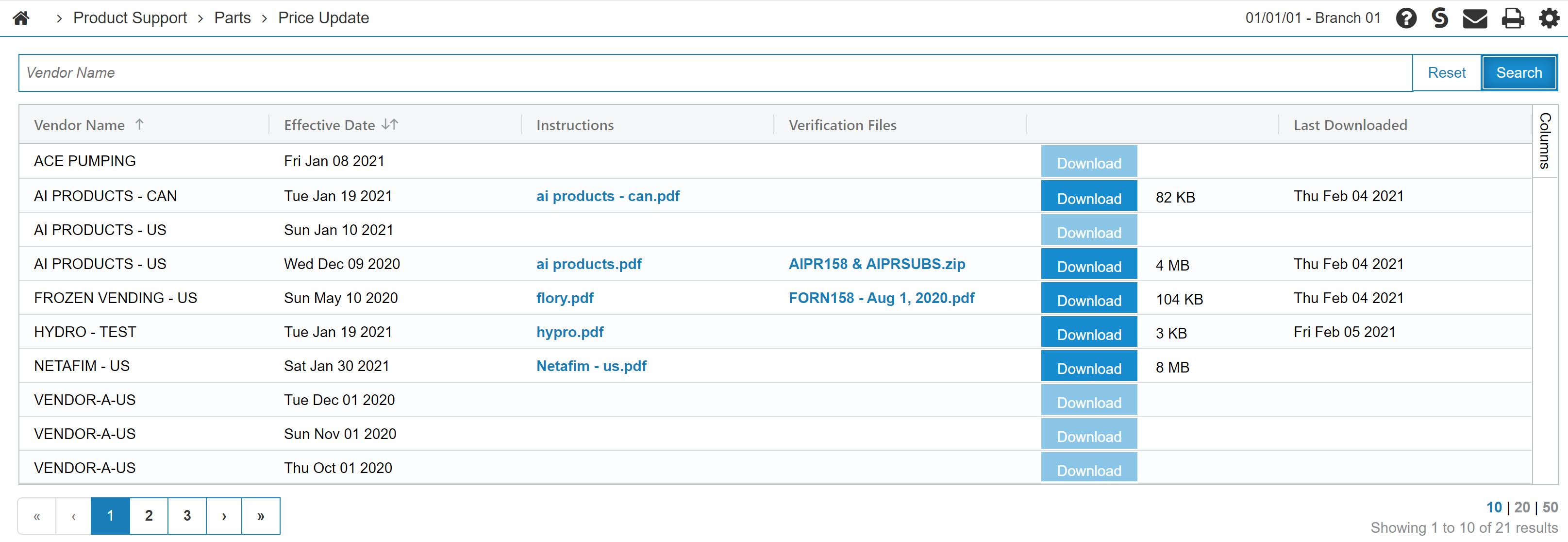
The fields displayed on the Price Update screen are:
| Field | Description |
|---|---|
| Vendor Name | The vendor for the price file. |
| Effective Date | The date when that price file was uploaded. |
| Instructions | Files that include how to download the update and how to use the Green Screen program to apply the changes. |
| Verification Files | A sample view of the detail provided by the price update. |
| Last Downloaded | The date the price file has been downloaded to your system. |
Click Download on a price file row to download the available price file into the system.
The buttons on the Price Update screen are:
| Button | Description |
|---|---|
| Price Update Contacts |
Opens the Configuration: Price Update Contacts screen to manage the email addresses that receive notification when price files are available for download. This button is only visible when the Manage Price Update Contacts security switch is enabled. |
| Import Caterpillar Semi-Annual Price File |
Opens the Import Caterpillar Semi-Annual Price File screen to upload a Caterpillar semi-annual price file to IntelliDealer. Use the uploaded file to update Caterpillar parts pricing information from the green screen price update program. This button is only visible when feature 6198 is licensed. |
| Import Ditch Witch Price File |
Opens the Import Ditch Witch Price File screen to upload a Ditch Witch price file to IntelliDealer. Use the uploaded file to update Ditch Witch parts pricing information from the green screen application. The Ditch Witch price file is only available from the Ditch Witch portal. VitalEdge cannot provide this file. This button is only visible when feature 6208 is licensed. |
| Import Bobcat Price File |
Opens the Import Bobcat Price File screen to upload a Bobcat price file to IntelliDealer. Use the uploaded file to update Bobcat parts pricing information from the green screen application. The Bobcat price file is only available from the Bobcat portal. VitalEdge cannot provide this file. This button is only visible when feature 6146 is licensed. |
Security: 832 - Product Support - Parts Price Update
Learning Resources: How to Download a Price File; How to Install a Price File
Revision: 2026.08