
Rental Contract: Miscellaneous Charges
Use the Miscellaneous Charges tab to view the miscellaneous charges and credits that are automatically charged to the rental transaction based on the stock number of the rental unit.
To open the Miscellaneous Charges tab, click a Contract Number or the Need to create a new contract? Click here to add link on the Rental Counter screen.
 Miscellaneous Charges tab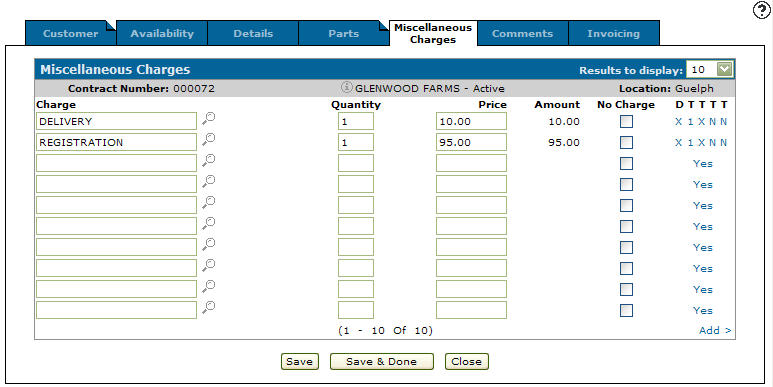
Information fields on the Miscellaneous Charges tab are:
| Information | |
|---|---|
| Field | Description |
| Contract Number | The rental contract number. |
| Customer Name |
The name of the customer associated to the contract. If the contract was created for a miscellaneous customer, the name specified in the Ship To field on the Customer tab of the contract appears. |
| Location | The location of the rental contract. |
Fields on the Miscellaneous Charges tab are:
| Field | Description |
|---|---|
| Charge | The charge assigned to the rental contract. |
| Quantity | The amount of charges on the rental contract. |
| Price | The price of the charge. |
| Amount | The total amount of the charge. |
| No Charge | If the customer should not be invoiced for the charge. |
| DTTTT | Change tax and discount information that applies to the charge. |
Click the Select Recommended Miscellaneous Charges link to display a list of optional miscellaneous charges that can be added to the contract.
Note: The Select Recommended Miscellaneous Charges link appears only if there are optional miscellaneous charges loaded on the Category/Class/Subclass attached to the stock number loaded in the Stock Number field on the Details tab of this contract.
Click Save to save changes made on the Miscellaneous Charges tab.
Click Save & Done to save changes made on the Miscellaneous Charges tab and exit from the rental contract.
Click Close to close the tab without saving and return to the Rental Counter screen.
Data Source: RMMISC
Revision: 2026.01