
Surplus Returns - Update
Use the Surplus Returns - Update screen to update a surplus return.
The Surplus Returns - Update screen is accessed from the Surplus Returns screen by hovering over a Return Number and selecting Update from the pop-up menu.
Topics in this section are:
Updating a Surplus Return
-
Navigate to Product Support > Parts > Surplus Returns.
-
To locate a specific return, fill out the appropriate fields and click the Go >> link.
The Surplus Returns screen refreshes listing the generated search results.
-
Move the cursor over a Return Number and select Update from the pop-up menu.
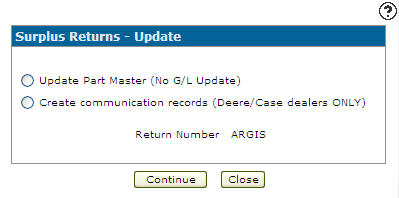
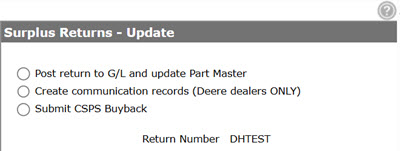
The Surplus Returns - Update screen appears. The appearance of the screen is dependent on the setting of the Do not update G/L in Surplus Returns checkbox, located at Configuration > Miscellaneous > Other > System Settings on the System tab.
If Do not update G/L in Surplus Returns is selected:
The Update Part Master (No G/L Update) option allows you to update the Parts Profile without posting the return to the general ledger. Continue to Using the Update Part Master (No G/L Update) Option
If Do not update G/L in Surplus Returns is not selected:
The Post return to G/L and update Part Master option allows you to post the surplus return file to the general ledger and update the Part Master. Continue to Using the Post return to G/L and update Part Master Option.
Note: This option automatically deletes the RETURN part number to prevent duplicate postings. This option should only be used after all communication records have been transmitted to the vendor, if applicable.
You may also see an option to Submit CSPS Buyback when Feature 6240 (CNH CSPS) is licensed. For details, see CNH CSPS Interface.
 The
The 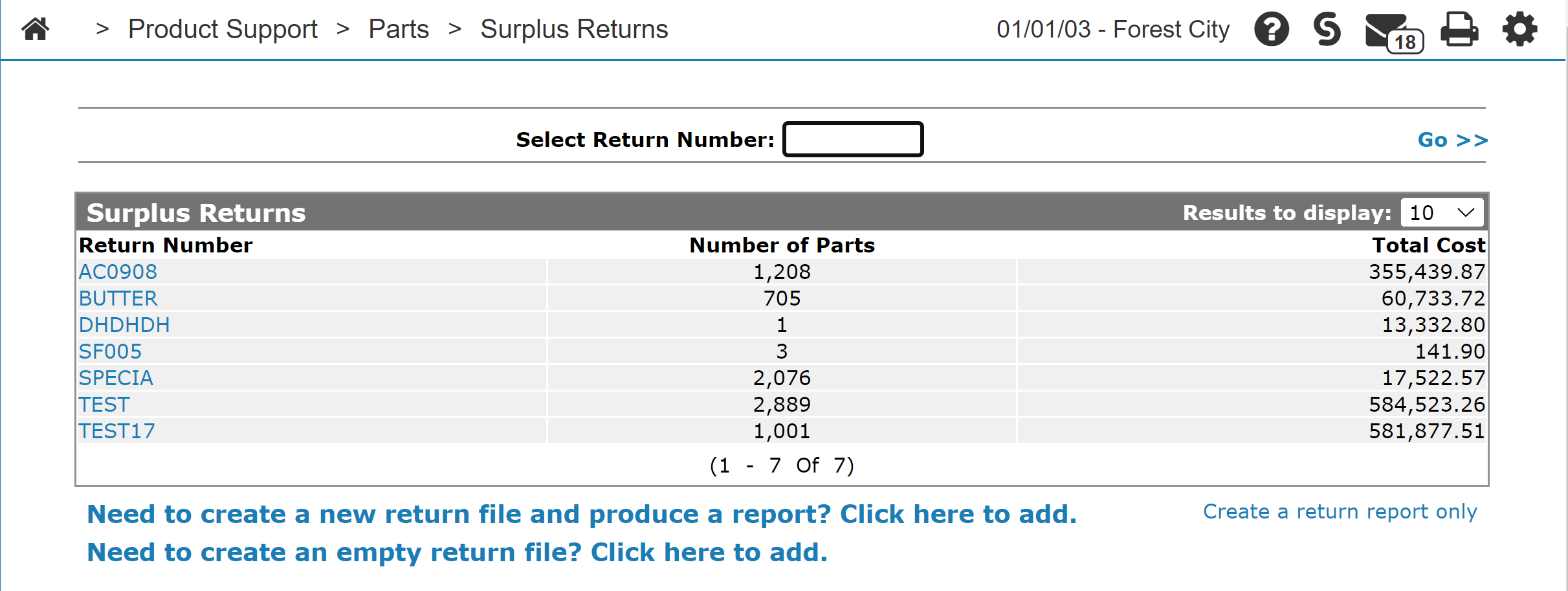
Using the Update Part Master (No G/L Update) Option
-
On the Surplus Returns - Update screen, select the Update Part Master (No G/L Update) radio button.
-
Click Continue.
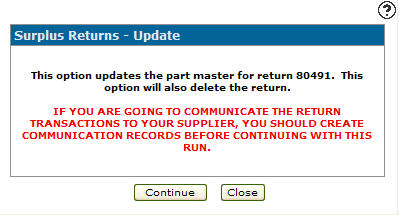
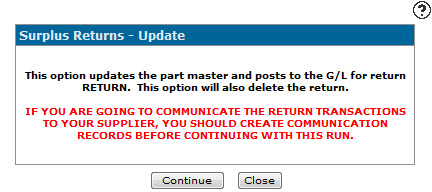
The Surplus Returns - Update screen refreshes indicating that the Part Master file will be updated and a warning notifies you to create a communication record to communicate the return transactions to the vendor (Deere and Case Only). For more information about creating a communication record for the vendor, see Surplus Return Communication Records.
-
Click Continue to update the selected surplus return.
Using the Post return to G/L and update Part Master Option
-
Select the Post return to G/L and update Part Master radio button on the Surplus Returns - Update screen.
-
Click Continue.
The Surplus Returns - Update screen refreshes indicating that the Part Master file will be updated and posts to the G/L, and a warning notifies you to create a communication record in order to communicate the return transactions to the vendor (Deere and Case Only). For more information about creating a communication record for the vendor, see Surplus Return Communication Records. -
Click Continue.
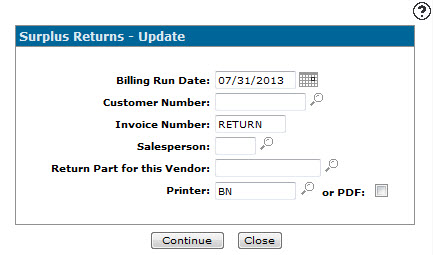
The Surplus Returns - Update screen refreshes. -
Enter or select a Billing Run Date, Customer Number, Invoice Number, and Salesperson to map the return to.
The Customer Number must already exist in order to be valid.
-
Enter or select the part number that will be used track the return on the invoice in the Return Part for this Vendor field.
The part number must meet all of these criteria:
-
cannot be blank
-
cannot be more than 15 characters
-
must be configured in Parts Profile for the same location
-
must have vendor = ‘GL’
-
It is recommended that Deere dealers use the part number JDRETURN.
It is also recommended that you set up the sale account on the Return Part as a vendor receivable account. When the return is posted, the system posts a receivable for the customer entered and credits the part inventory account to alleviate the inventory. The debit to the receivable will be for the total current cost of the parts, and the inventory credit is at average cost. If the current cost and average cost is different, an entry is made to credit the cost of sales account for the part.
-
-
To update the selected surplus return file and post it to the general ledger, click Continue.
Screen Description
Search fields on the Surplus Returns - Update screen are:
| Field | Description |
|---|---|
| Update Part Master (No G/L Update) |
Updates the Parts Profile for the returned parts. The accounting is done as part of this procedure. The Update Part Master (No G/L Update) option appears when Do not update G/L in Surplus Returns is enabled. |
| Post return to G/L and update part master |
Posts your surplus return file to the general ledger and updates the Parts Profile. The accounting is done as part of this procedure. This option automatically deletes the RETURN number to prevent duplicate posting. This option should only be used after all parts are transmitted to your supplier. The Post return to G/L and update part master option appears when Do not update G/L in Surplus Returns is not enabled. |
| Create communication records (Deere/Case dealers only) |
Produces the surplus records for communications to Deere/Case. See Creating Communication Records for a Surplus Return. This option appears when Feature 6111 (John Deere interfaces) or Feature 6240 (CNH CSPS) is licensed. John Deere parts should have a vendor number of DEERE, JDM, or JD1234 where 1234 is your dealer number. For John Deere surplus part returns the program automatically uses the last four digits of the IntelliDealer vendor number starting with JD to provide Deere with your Dealer Number. For example, if the IntelliDealer vendor number for the returned part is JD1234, then the dealer number transmitted to Deere, or rendered on the report, is 1234. |
| Return Number | Indicates the surplus return you have selected to update. |
The report produced is:
| PAR094N | Surplus Return |
Use these buttons to complete your work on the Surplus Returns - Update screen:
-
Click Continue to update the surplus return.
-
Click Close to close the Surplus Returns - Update screen and return to the Surplus Returns screen.
Security: 828 - Product Support - Parts Surplus Return
Revision: 2026.09