Subtotaling Multiple Invoices Before Payment
Prerequisites: Before you can check invoice subtotals on multiple invoices you must first create a new cash receipt.
-
From on the Key Cash Receipts screen, select an invoice you wish to subtotal by selecting the corresponding checkbox.
-
Click on the Subtotal button.
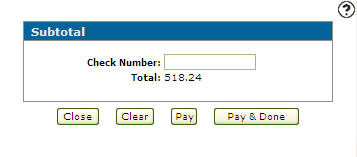
The Subtotal screen appears with the subtotal the select invoices.
-
Enter the Check Number you wish to use to pay off the selected invoices.
-
Click on the Pay button to apply the pay off the selected invoices.
- or -
Select the Pay & Done button to pay off the selected invoices and returns you to the Outstanding Accounts Receivable screen.