
Equipment Profile: Fluid Analysis
The Fluid Analysis tab lets you review historical oil and fluid sample results from Polaris Lab (eOilReports / Horizon) for the selected equipment unit. Managers and technicians can see sample severity, review analyst comments, and open the lab PDF report without leaving IntelliDealer.
Sample data is retrieved for the unit's Machine Serial Number. If more than one equipment profile shares the same serial number, each profile shows the same sample history.
The Fluid Analysis screen is accessed by clicking on the Fluid Analysis tab in the Equipment Profile.
 The Fluid Analysis screen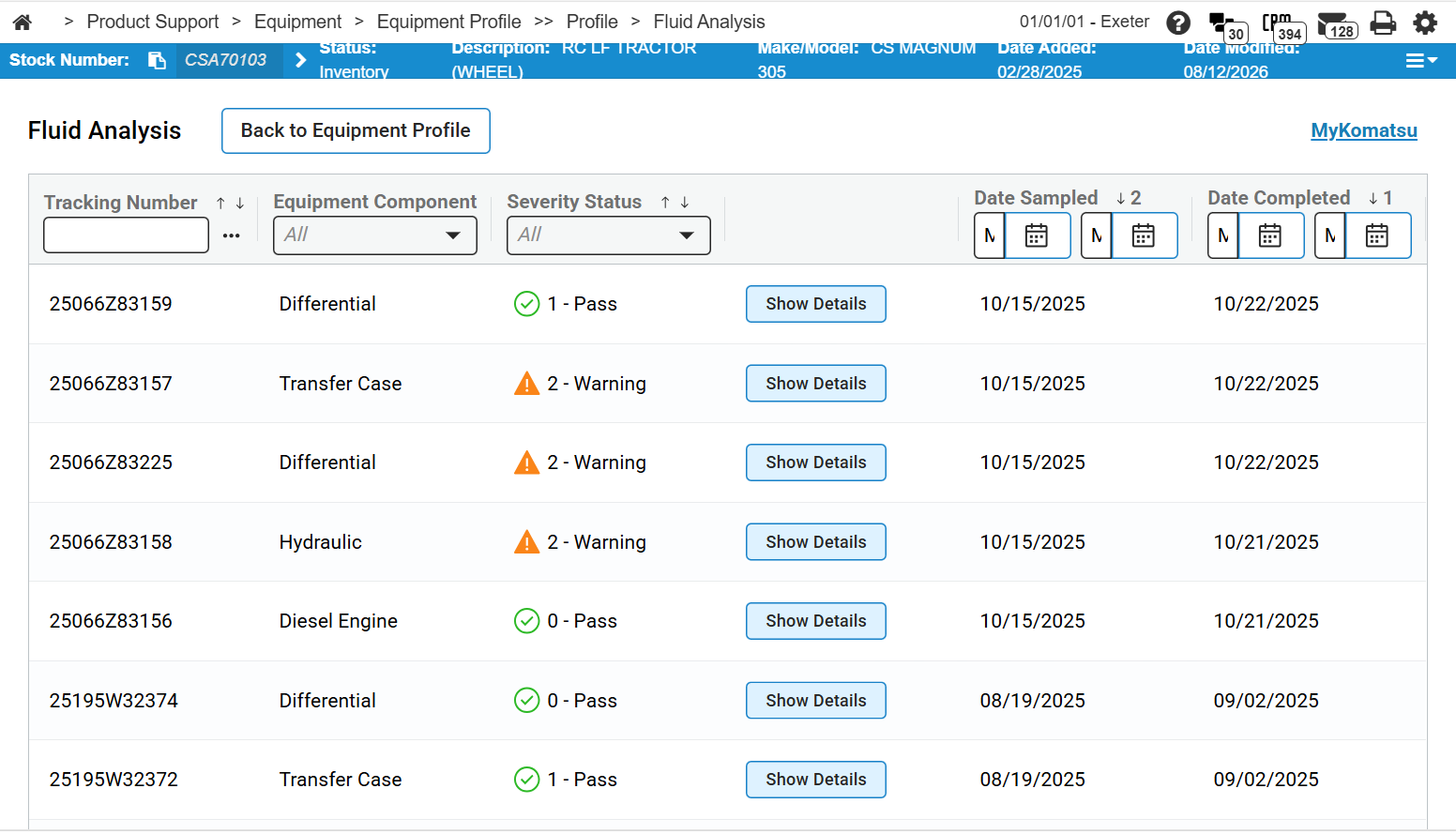
Topics in this section are:
Fluid Analysis Screen
The listing shows all fluid analysis samples for the unit's machine serial number, sorted by Date Completed with the most recent samples first. Sample data is synchronized from Polaris Lab by the Polaris Lab Sample Data Nightly Job. See Inventory/Equipment Jobs in IntelliDealer Batch Jobs. If no samples are available for the unit's serial number, the message No Fluid Analysis Samples Available appears. The MyKomatsu link on the right opens the MyKomatsu website in a new browser tab.
You can sort and filter each column. The columns are:
| Column | Description |
|---|---|
| Tracking Number | The barcode or tracking number for the sample jar received by the lab. |
| Equipment Component | The component sampled (for example, engine, hydraulic, or final drive). |
| Severity Status |
The severity assigned by the lab. Each value includes a status icon and a numeric label:
|
| Show Details | Opens a side panel with additional information for the selected sample. See Sample Details. |
| Date Sampled | The date the sample was taken. |
| Date Completed | The date the lab completed analysis. The listing defaults to the most recent completed date first. |
Sample Details
Click Show Details for a sample to open a side panel titled with the sample's Tracking Number and Equipment Component.
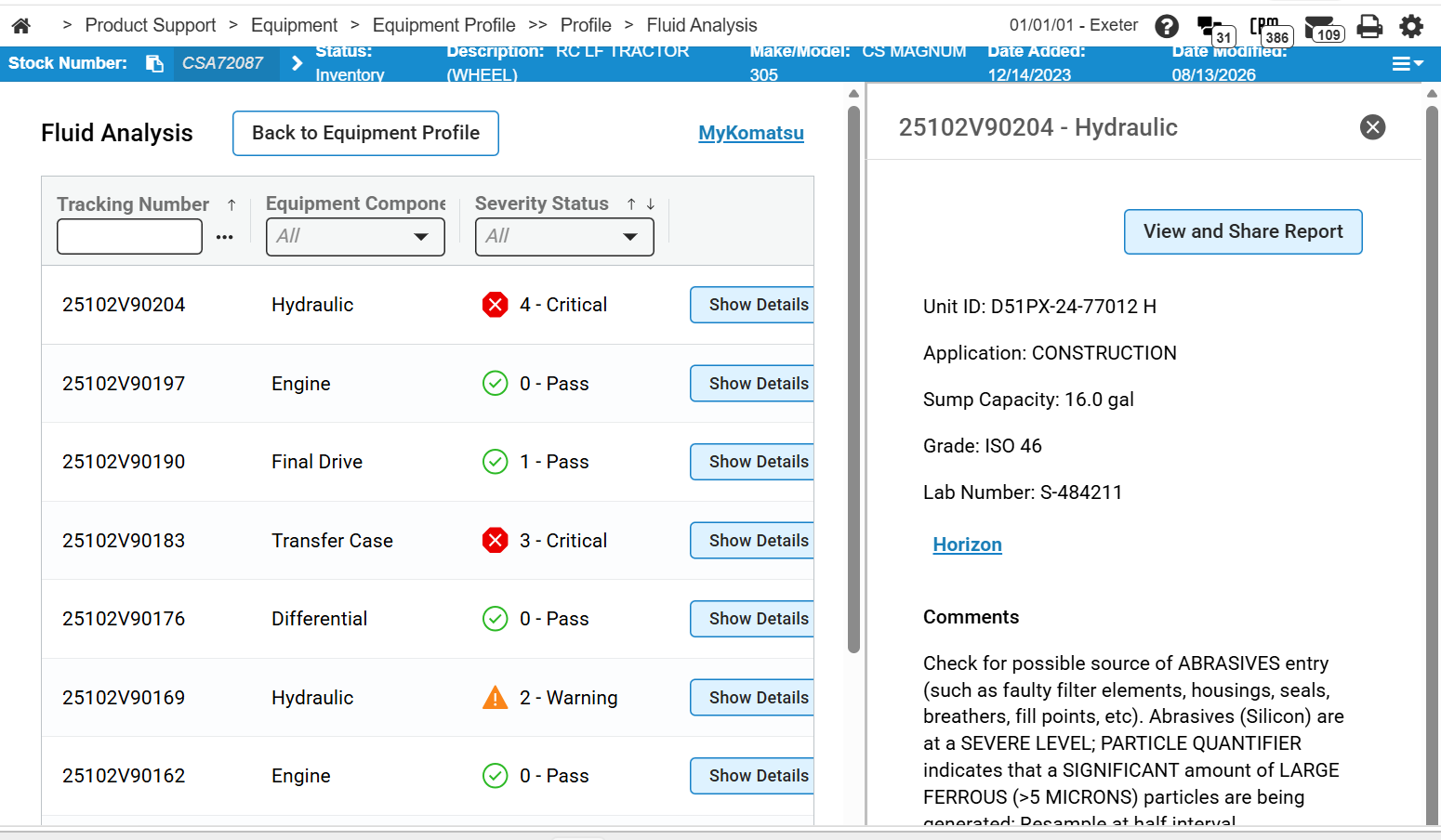
The side panel includes:
-
View and Share Report—opens the lab PDF report in a separate browser window. The report is retrieved from Polaris Lab when you click the button; it is not stored in IntelliDealer.
-
Unit ID—the unit identifier from the lab record.
-
Application—the application or usage reported for the component.
-
Sump Capacity—the sump capacity reported for the component.
-
Grade—the fluid grade (for example, SAE 15W40).
-
Lab Number—the lab-assigned sample number.
-
Horizon—opens the eOilReports / Horizon login page in a new browser tab.
-
Comments—analyst comments for the sample.
Company name and phone number from the lab API are not shown on this screen so the display stays consistent with IntelliDealer customer records.
Data Source: PLBSMPLD
Feature: 6533 (Fluid Sample Analysis)
Security: 800 - Equipment Profile
Revision: 2026.09