
Equipment Profile: Warranty Dates
Use the Warranty Dates screen to add a warranty date to the list on the Warranty Dates tab.
To open the Warranty Dates screen, click the Warranty Dates tab on the Equipment Profile.
 Warranty Dates tab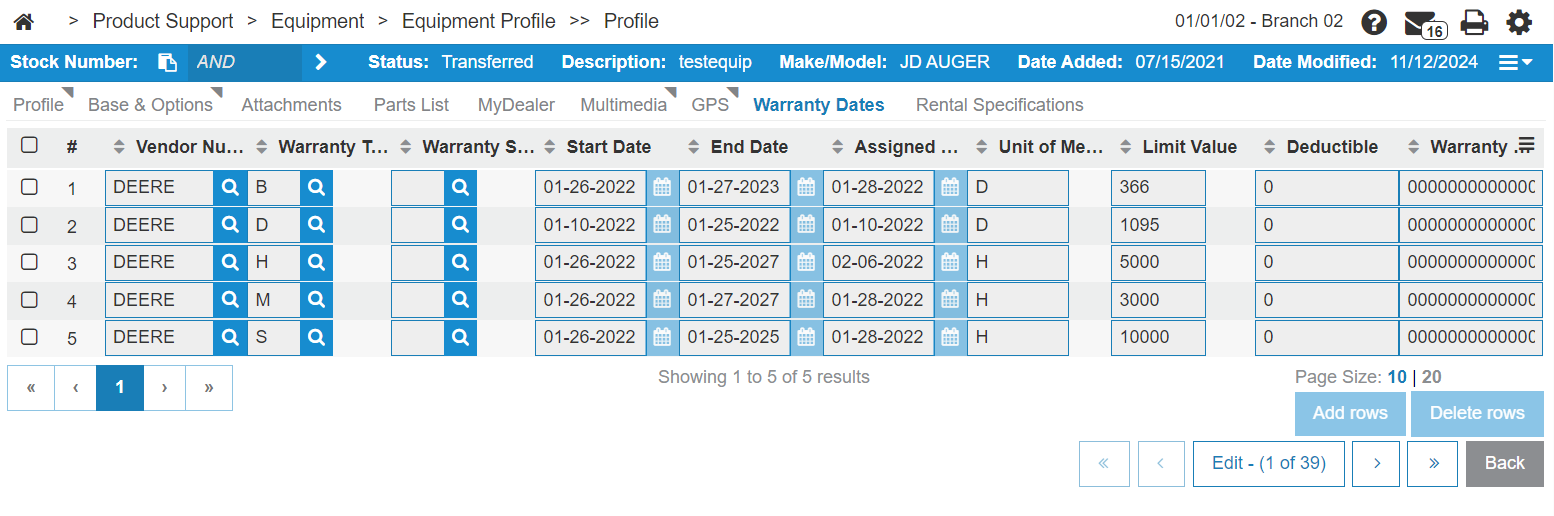
The fields on the Warranty Dates screen are:
| Field | Description |
|---|---|
| Vendor Number | The vendor number of the vendor issuing the warranty. |
| Warranty Type |
The type of warranty. The coverage of the warranty. Warranty Type codes are configured on the Warranty Type Codes screen. |
| Warranty Subtype |
The warranty subtype. The coverage of the warranty. Warranty Subtype codes are configured on the Warranty Subtype Codes screen. |
| Start Date | The warranty start date. |
| End Date | The date the warranty expires. |
| Assigned Date | The date the warranty was assigned. |
| Unit of Measure | The Unit of Measure code assigned to the warranty. |
| Limit Value | The master warranty limit type value that corresponds to the master warranty limit type. |
| Deductible | The warranty deductible amount. |
| Warranty Number | The warranty type identification number. |
When warranty dates are synchronized from John Deere, IntelliDealer stores any imported start, end, or assigned date before 01/01/1975 as 01/01/1975. This applies to dates written by the John Deere Warranty Dates batch jobs and by JD Warranty Services.
Click Add rows to add a new Warranty Date.
Select one or more rows and click Delete rows to remove Warranty Dates from the list.