
Miscellaneous Charges - Search
Use the Miscellaneous Charges screen to search for and select a miscellaneous charge from the list. The list on this screen is populated with valid miscellaneous codes set up on the Miscellaneous Charges screen.
To open the Miscellaneous Charges screen, click the Search icon next to the Charge field on the Miscellaneous Charges tab.
 Miscellaneous Charges Search screen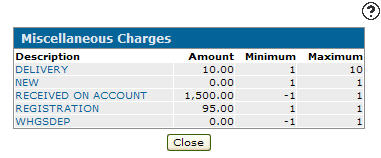
The fields on the Miscellaneous Charges screen are:
| Field | Description |
|---|---|
| Description | A brief description of the miscellaneous charge. |
| Amount | The amount of the miscellaneous charge. |
| Minimum | The minimum miscellaneous charge that can be applied. |
| Maximum | The maximum miscellaneous charge that can be applied. |
To look up a Miscellaneous Charge, enter a term in the search field.
To populate the Charge field on the Miscellaneous Charges tab of an Equipment Invoice or Quote, select a charge from the list.
To exit the window without selecting a charge, click Close.