
Customer Profile: Multimedia
The Multimedia tab allows you to view, add or edit multimedia links associated to the selected equipment profile, work order, or customer profile.
Files must be less than 15 MB.
The fields on the Multimedia tab are:
| Field | Description |
|---|---|
| File Name | The name of the multimedia file. |
| Title | An additional title for the multimedia file. |
| Classification |
A classification for the multimedia file. Multimedia classifications can be added to a file within the Customer Profile to separate items that require further distinction. Each label only acts to further classify and distinguish between other, similar files. With the exception of the following:
Note: User-defined entries are configured in Language Maintenance. |
| Added Date | The date the multimedia file was added. |
| Added Time | The time the multimedia file was added. |
| Added By | The person who added the multimedia file. |
| Action | You can choose to Update the multimedia file or Delete the file from the list. |
Click on a thumbnail to process the multimedia file.
Note: If the multimedia file is larger than 1MB, a Click to display links appear in place of a thumbnail. The thumbnails only display previews of .png, .gif, .bmp, and .jpg (NOT .jpeg) files. Click the link to view the associated image.
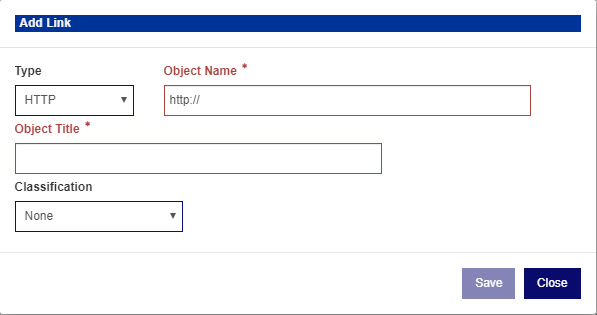
Click the Add an External Link to open the Add Link window:
Click the Add from IntelliDealer Server button to open a list of hosted multimedia files that you can Associate items with.
The Associate & Keep option not only associates the multimedia file but will then be kept as an associated multimedia file.
Click the File Upload button to upload your own image to the list.
Security: 996 - Customer Profile
Revision: 2024.07