
Parts Profile: Reman/Core
The Reman/Core tab lists all core part numbers associated with their corresponding reman part number. The primary core number (the core number sold with the reman number) is identified with a checked box. All other core numbers loaded are used for core returns.
The Reman/Core tab can be accessed from the Parts Profile screen by clicking on the Update/View Profile link.
 Reman/Core tab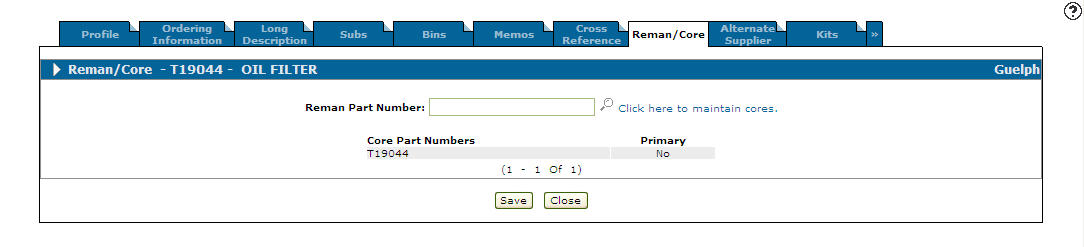
These fields appear on the Reman/Core tab:
| Field | Description |
|---|---|
| Reman Part Number | A remanufactured part is cataloged in the system and linked to the core part number (new/base part) available in the system. Reman = Remanufactured Part |
| Core Part Number | The core part number linked to the reman part number. |
| Primary | The primary code number is the core number sold with the reman number. |
Select the Click here to maintain cores link to maintain cores.
These buttons allow you to complete your work on theReman/Core tab:
| Button | Function |
|---|---|
| Save | Saves changes made on the Reman/Core tab. |
| Close | Closes the Reman/Core tab without saving and returns to the Parts Profile screen. |