
CNH CSPS Shipment Details Inquiry
Use the CSPS Shipment Details Inquiry to search for shipment details pertaining to submitted orders in CSPS. You can also get tracking details in real time from the shipper directly, with CSPS retrieving the information.
Prerequisites: To use this screen, you must first set up the CNH CSPS interface. See CNH CSPS Interface.
See also CNH CSPS FAQ and Troubleshooting.
To open CSPS Shipment Details Inquiry, navigate to Product Support > Parts > Parts Ordering. In the top right corner of the screen, hover over Ordering Options and select CSPS Shipment Details Inquiry.
 Shipment Details Inquiry screen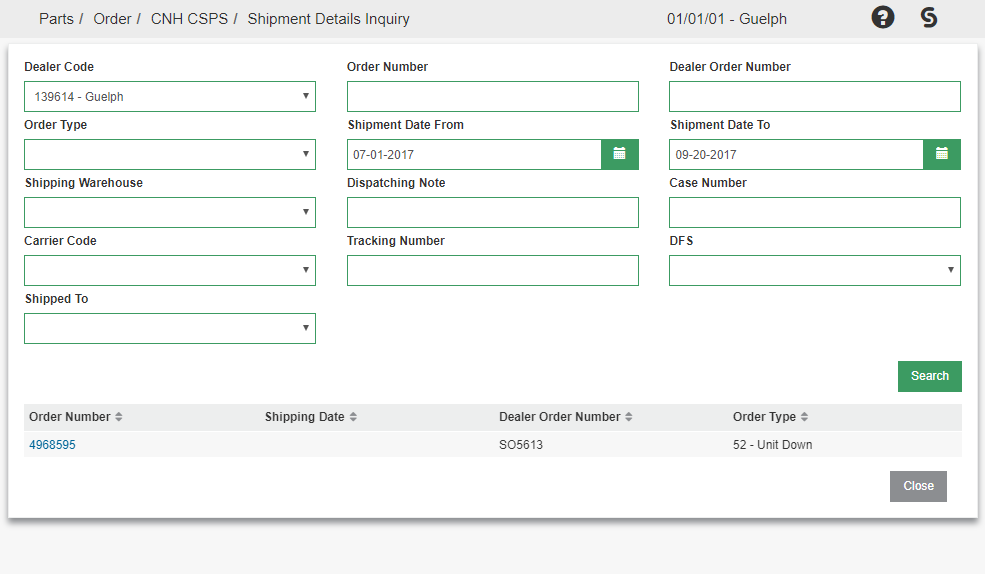
Search for shipment information on this screen, and click the order number to open the Shipment Details screen.

All parts on the order are listed here. If Tracking Details are available, the case number is displayed in the right column. Click the case number to open the Tracking Details window and view shipment status from CNH.
Click the Part Number to open Line Details for a shipment line.
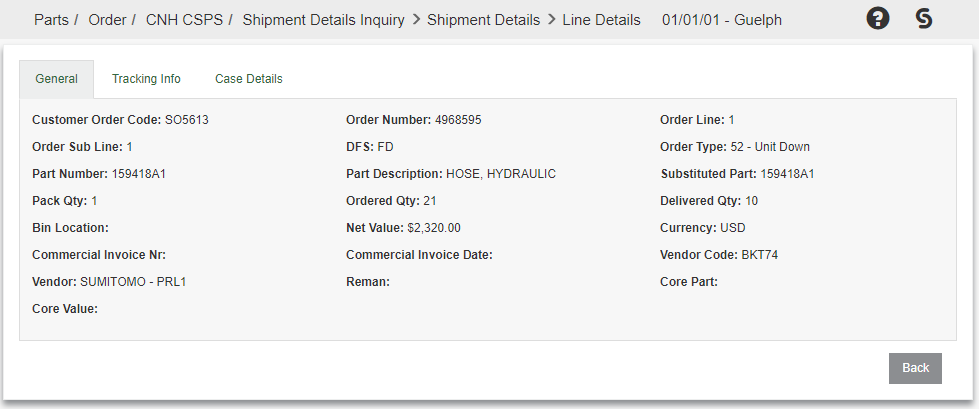
The General, Tracking Info, and Case Details tabs are available for you to view further information about your shipment.
On the Tracking Info tab, the Tracking Number field displays the value returned by CNH. If CNH returns a tracking URL, the field is a clickable link that opens the carrier tracking page in a new browser window. If CNH returns a tracking number only, the number is displayed as text.
When you open Tracking Details from the shipment grid, a tracking URL returned by CNH is also displayed as a clickable link in that window.